
 Exchangepedia Blog is read by visitors from all 50 US States and 150 countries world-wide
Delay Notifications: Informing users about delays in mail delivery
Posted by Bharat Suneja at 7:30 AM
Users consider email to be a reliable communication mechanism - not as reliable as the dial tone, but pretty close. Most users expect mail to be delivered within minutes, if not seconds.
Many organizations, including those operating in the financial & banking sectors, have strict SLAs for mail delivery which specify mail delivery times granularly— for mail within a particular location (that is, within a Routing Group in Exchange 2003 and within an AD Site in Exchange 2007), between two locations, and to/from the internet.
Exchange Server sends a delay notification to inform the sender if delivery of a message is delayed beyond a configured timeout. The default delay notification timeout in Exchange Server 2003 is 12 hours. This has been reduced to a (comparatively) more realistic 4 hours in Exchange Server 2007.
When considering changing these defaults, it's a good idea to consider any SLAs and user expectations. Is it reasonable to expect a user to wait for 24 hours before informing him/her about a delay? 12 hours? 1 hour?
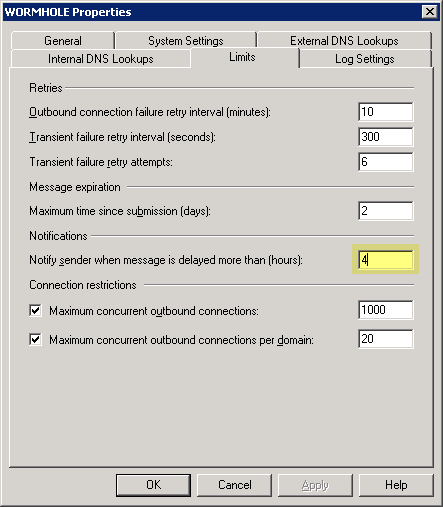
Figure 1: In Exchange 2007, the default delay notification timeout is 4 hours
You can change the delay notification timeout using the Exchange console (EMC) from Server Configuration | Hub Transport | SERVERNAME -> Properties | Limits tab.
To change delay notification timeout using the Exchange shell:
In Exchange Server 2003, the delay notification timeout can be changed from SMTP Virtual Server | Properties | Delivery tab. There are different delay notification timeouts for outbound and local mail.
If you decide users don't need to know about mail delivery delays (and there could be perfectly legitimate reasons for that - although as I write this I can't think of any... ), you can disable delay notifications:
Related:
Many organizations, including those operating in the financial & banking sectors, have strict SLAs for mail delivery which specify mail delivery times granularly— for mail within a particular location (that is, within a Routing Group in Exchange 2003 and within an AD Site in Exchange 2007), between two locations, and to/from the internet.
Exchange Server sends a delay notification to inform the sender if delivery of a message is delayed beyond a configured timeout. The default delay notification timeout in Exchange Server 2003 is 12 hours. This has been reduced to a (comparatively) more realistic 4 hours in Exchange Server 2007.
When considering changing these defaults, it's a good idea to consider any SLAs and user expectations. Is it reasonable to expect a user to wait for 24 hours before informing him/her about a delay? 12 hours? 1 hour?
Figure 1: In Exchange 2007, the default delay notification timeout is 4 hours
You can change the delay notification timeout using the Exchange console (EMC) from Server Configuration | Hub Transport | SERVERNAME -> Properties | Limits tab.
To change delay notification timeout using the Exchange shell:
Set-TransportServer "SERVERNAME" -DelayNotificationTimeout 01:00:00
This sets the notification timeout to 1 hour. The value is specified in dd.hh:mm:ss (the standard format used by the shell). Valid values— minimum: 00:00:01 (yes, 1 second!) to 30.00:00:00 (30 days). It's recommended to wait till transient failure retries have been completed before sending a delay notification (that is, higher than TransientFailureRetryInterval x TransientFailureRetryCount).In Exchange Server 2003, the delay notification timeout can be changed from SMTP Virtual Server | Properties | Delivery tab. There are different delay notification timeouts for outbound and local mail.
If you decide users don't need to know about mail delivery delays (and there could be perfectly legitimate reasons for that - although as I write this I can't think of any... ), you can disable delay notifications:
Set-TransportServer "SERVERNAME" -ExternalDelayDsnEnabled $false -InternalDelayDsnEnabled
$false
Related:
Labels: Administration, Exchange Server 2007, Exchange Shell, SMTP



2 Comments:
Here's a scenario for you...
We have an Exchange 2007 CCR cluster and the last few times that we have forced a failover so we can patch/upgrade one of the nodes, Exchange has sent our Delivery Delayed notices when services were transferred. In all cases, the Delivery Delayed notices were erroneous - the messages had actually been delivered earlier that day (e.g. got a message at midnight when we did the switch that a message sent at 3pm had not been delivered when it had been delivered at 3pm). Our threshold is set at 4 hours. So, now I'm thinking of disabling the Delivery Delayed notification ahead of any planned failover.
This is exactly the scenario we have run int. Therefore, as part of our scheduled maintenance procedures, we disable the notification until after we are done working on the cluster.
Post a Comment
Links to this post:
Create a Link
<< Home