In Distribution Groups and maximum recipients per message, we looked at how the maximum recipients per message settings are treated differently by Exchange Server 2010/2007 and Exchange 2003/2000 when sending to Distribution Groups.
Message size limits are an important mechanism to control mailbox sizes, guarantee service availability, and protect from potential DoS attacks. Another commonly asked question is about message size limits and the inability to send messages that are apparently within the maximum sizes configured. Let’s take a look at the message size settings in different places in Exchange 2010 and Exchange 2007.
 Organizational limits
The organizational send and receive size limits apply to all Exchange servers in the Organization. The default is 10MB.
You can modify the organizational message size limits using the Set-TransportConfig cmdlet from the Exchange shell:
Set-TransportConfig -MaxReceiveSize 40MB -MaxSendSize 40MB
In Exchange 2007 SP1 and later, you can also set the organizational message size limits using the EMC by going to Organization Configuration | Hub Transport | Global Settings tab | Transport Settings | properties | General tab.
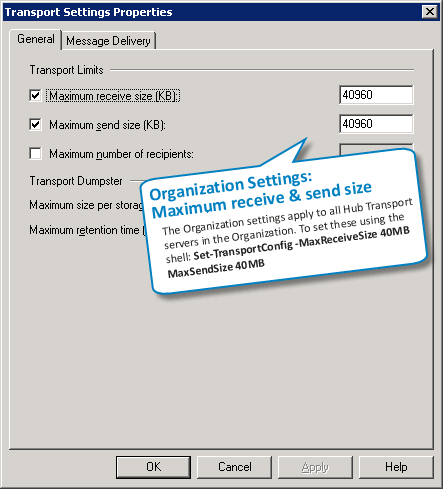
Figure 1: Setting the organizational message size limits from the Global Settings tab in the EMC in Exchange 2007 SP1 and later
 Receive Connector limit
Unlike Exchange SMTP Virtual Servers in Exchange Server 2003/2000, Exchange 2007’s Receive Connectors are only used to receive messages. You can use different Receive Connectors with different maximum message size limits. For example, a Receive Connector for inbound Internet mail may have lower message size limits, but you may want to allow larger messages on Receive Connector for authenticated senders, partners or scanners and multi-function devices that can send large scanned images or PDF files.
To modify the maximum message size on a Receive Connector using the Exchange console, select Server Configuration | Hub Transport | select a Hub Transport server | Receive Connectors -> select a connector | Properties | General tab.
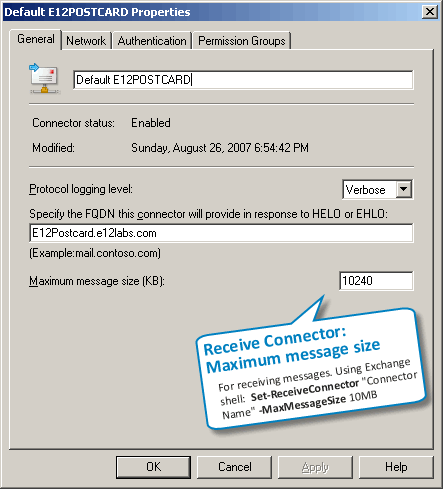
Figure 2: Setting the maximum message size on a Receive Connector
To set ReceiveConnector limit using the shell:
Set-ReceiveConnector “CONNECTOR NAME” -MaxMessageSize 40Mb
What’s a Unique Binding for a Receive Connector?
Exchange 2003/2000’s SMTP Virtual Servers consider a unique combination of an IP address + TCP port number as a unique binding, and don’t allow another SMTP Virtual Server to be bound to the same IP address + port combination. Exchange 2010/2007’s more evolved view of a unique binding is a combination of IP address + port + RemoteIPRanges.
What this means:
- You don’t need another IP address to create a separate Receive Connector with different settings.
- You don’t have to use a non-default port when using the same IP address to create a separate Receive Connector.
- You can create a Receive Connector using the same IP address + port number, but using different RemoteIPRanges to specify the remote hosts that can connect to it. For example, you can create a Receive Connector for a set of remote hosts and specify a different message size to allow those hosts to send larger messages, or to restrict them to smaller messages.
 Send Connector limit
Send Connectors are used for sending outbound messages to the internet or particular address spaces (domains). Edge Transport servers also have a Send Connector to send inbound messages to Hub Transport servers in an AD Site. To modify the maximum message size on Send Connectors, select Organization Configuration | Hub Transport | Send Connectors -> select connector | Properties | General tab.
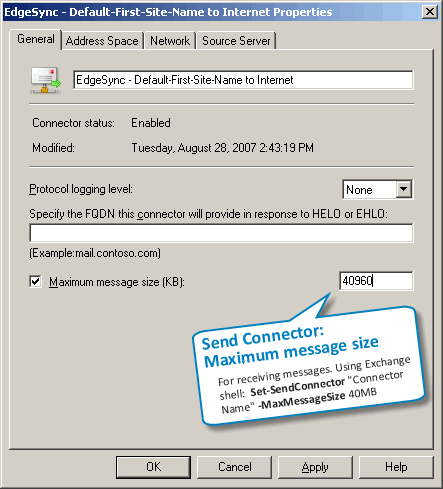
Figure 3: Setting the maximum message size on a Send Connector
To set SendConnector limit using the shell:
Set-SendConnector “CONNECTOR NAME” -MaxMessageSize 40Mb
 Recipient limits
In Exchange 2010/2007, you can configure individual message size limits on the following recipient types to bypass the Organizational limits:
- Mailbox (Mailbox User, aka mailbox-enabled user in previous versions)
- Contact (aka Mail Contact)
- Mail User (aka mail-enabled user in previous versions)
- Distribution Group
- Public Folder
To set these using the Exchange console: Recipients | Mailbox -> select mailbox (or select another recipient type such as a contact or mail user from the corresponding node) | properties | Mail Flow Settings tab | Message Size Restrictions.
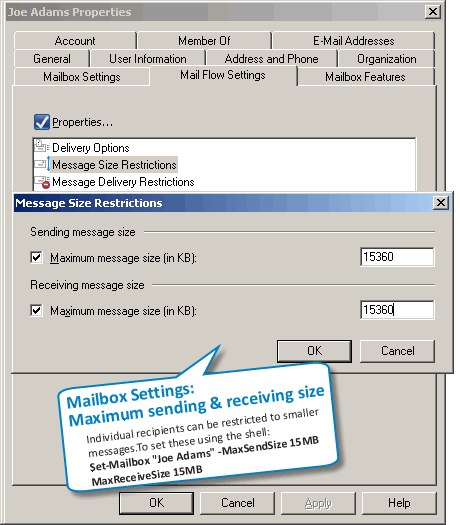
Figure 4: Setting the maximum message size on a mailbox
To set message size limits on a mailbox using the Exchange shell:
Set-Mailbox “Joe Adams” -MaxSendSize 20Mb -MaxReceiveSize 20Mb
Distribution Groups and Contacts (MailContacts) only have maximum receive size in the Exchange console, but both MaxReceiveSize and MaxSendSize properties can be set for them using the Exchange shell.
Do individual message size limits bypass the Organization message size limits?
This is perhaps one of the most misunderstood part of message size limits, and therefore a frequently asked question: when you specify individual message size limits for a recipient, does it override other message size limits in your Exchange organization?
In a nutshell, setting higher message size limits on an Exchange recipient bypasses the maximum message sizes in the Exchange Organization configuration, but only for internal messages, not for messages sent to or received from the Internet and other unauthenticated sources.
Remember, for a message to be delivered successfully, the message size must be within the max message size limits applicable to both – the sender and the recipient. Because the identity of unauthenticated or anonymous senders and recipients can’t be established (because… they’re unauthenticated!), the organizational limit applies.
 Active Directory SiteLink limit
In Exchange Server 2007 SP1, you can also set maximum message size limit on AD Site Links. Exchange Server 2007 uses the AD Site topology to determine the least cost paths. If the message size to be delivered to a remote AD Site exceeds the limit on the AD Site Link, message delivery will fail. By default, the MaxMessageSize on AD Site Links is set to unlimited. This can be changed using the following command:
Set-ADSiteLink “SITE LINK NAME” -MaxMessageSize 20Mb
Message size limits during coexistence with Exchange 2003
 Global Settings
Besides the above, another message size limit can impact Exchange Server 2010/2007 recipients if you’re transitioning from Exchange 2003/2000, but it’s often overlooked when troubleshooting. This is the one in Exchange Server 2003 Global Settings | Message Delivery -> Properties.
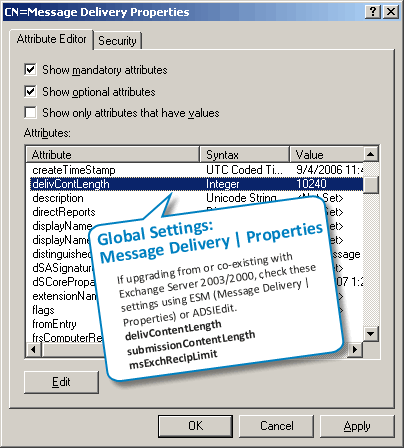
Figure 5: You can use ADSIEdit to configure message size and max recipients per message in Global Settings
– If you have these configured to a specific value before you upgrade the Organization to Exchange Server 2010/2007, these are left untouched.
– If you have these set to “No Limit” before the Exchange Server 2007 upgrade, these are reset to the Exchange Server 2007 defaults.
– In case Exchange Server 2007’s Organization settings (the ones you can set using Set-TransportConfig) conflict with these legacy Global Settings, the lower of the two sizes are used.
The problem is, these are neither visible in the EMC, nor using any of the Exchange shell commands.
If you still have an Exchange Server 2003 server in the Organization, you can use ESM to modify these limits. Alternatively, you can use ADSIEdit to browse to the Configuration container | Services | Microsoft Exchange | YourOrgName | Global Settings | Message Delivery -> Properties, and modify the following attributes as required:
- delivContentLength -> corresponds to MaxReceiveSize parameter in Set-TransportConfig command.
- SubmissionContentLength -> corresponds to MaxSendSize parameter in Set-TransportConfig command.
Note: The maximum value for both of the above is 2097151 KB, slightly under 2 Gb.
- msExchRecipLimit -> corresponds to MaxRecipientEnvelopeLimit parameter in Set-TransportConfig command.
Set these to be the same as the equivalent Organization settings in Exchange Server 2007.
Exchange Server 2007 SP1 makes managing changes to Exchange 2003’s Global Settings easier— if they have numeric values (i.e. aren’t set to “No Limit”), using Set-TransportConfig to change maxReceiveSize, maxSendSize or maxRecipientEnvelopeLimit also changes the corresponding Global Settings.
 Routing Group Connector Limit
Routing Group Connectors are used in co-existence scenarios to transfer messages between Exchange Server 2003/2000 Routing Groups and the Exchange Server 2007 Routing Group (yes, there is one under the hood.. ). Messages exchanged between these Routing Groups should be below the message size limits of their respective RGCs. The default is set to unlimited.
To set the MaxMessageSize on a Routing Group Connector:
Set-RoutingGroupConnector “CONNECTOR NAME” -MaxMessageSize 20Mb
Content conversion and message size limits
When troubleshooting message size-related issues, the content conversion process was another source of confusion. Content conversion happens when Exchange converts an internet/MIME message to MAPI/Exchange format, and vice versa. Content conversion generally increases the message size — roughly by 30%. If you set a maximum message size of 10Mb., and wonder why a 9 Mb. attachment didn’t make it through, consider the content conversion overhead, as also message headers (which are computed along with the DATA portion of the message to calculate the message size), and any actions taken by Transport Rules or other transport agents.
How does Exchange 2010/2007 handle such messages? When a message enters the Exchange 2010/2007 Organization, it gets stamped with a X-MS-Exchange-Organization-OriginalSize header, which indicates the original size of the message before content conversion. When considering message size limits, if the message has since ballooned to a larger size due to content conversion, added headers, etc. the lower of the original message size and the current (converted) message size is considered, eliminating some of the confusion seen with message sizes in previous versions.
Troubleshooting Sender and Recipient Size Limits
Consider the sender’s MaxSendSize and the internal recipient’s MaxReceiveSize when troubleshooting message size issues.
If the the sender isn’t allowed to send a message of that size, you get the following NDR:
#550 5.2.3 RESOLVER.RST.SendSizeLimit; message too large for this sender ##
If the sender’s size limits allow sending a large message, but the recipient’s limits do not allow receiving a message of that size, you get a NDR with the following text (note the enhanced status code informing you exactly why the message was rejected):
#550 5.2.3 RESOLVER.RST.RecipSizeLimit; message too large for this recipient ##
Using the Exchange shell to track failed message delivery
You can use the Exchange shell to track messages that could not be delivered because of message size issues. The RecipientStatus field in Message Tracking logs is used to store the SMTP response and enhanced status codes. The Message Tracking EventID we’re looking for is FAIL. (Read previous post on message tracking: “Exchange Server 2007: Message Tracking from the command line“)
To track messages that failed because of recipient’s MaxReceiveSize:
Get-MessageTrackingLog -EventID FAIL | where {$_.RecipientStatus -like “*RecipSizeLimit*”}
To track messages that failed because of the sender’s MaxSendSize:
Get-MessageTrackingLog -EventID FAIL | where {$_.RecipientStatus -like “*SendSizeLimit*”}
Exchange MVP Michel de Rooij has published a Configure-ClientSizeLimits.ps1 script to allow you to configure message size limits affecting OWA and EAS clients. See Client Message Size Limits on his blog.
Message size limits in Exchange Online
In Exchange Online, the message size limit is set to 150MB (for Outlook on Windows, 112MB for OWA and a much lower 35MB for Outlook Mac – likely Outlook Mac 2011). Exchange Online also limits the number of attachments per message to 250. You can find all Exchange Online limits, including message size limits, in a single, comprehensive doc – Exchange Online Limits.
Message size-related documentation
- Message site limits (Exchange 2013, TechNet)
- Understanding message size limits (Exchange 2010, TechNet)
- Exchange Online Limits (Exchange Online Service Description, TechNet)
- Configure message size limits for a mailbox (Exchange 2013, TechNet)
- Configure Message Size Limits for a Mailbox or a Mail-Enabled Public Folder (Exchange 2010, TechNet)
- Configure Maximum Message Size in Outlook Web App (Exchange 2010, TechNet)
- Configure client-specific message size limits (Exchange 2013, TechNet)
- Set Message Size Limits for Exchange Web Services (Exchange 2010, TechNet)
- How to set size limits for messages in Exchange Server (Exchange 2003/2000 KBA, Microsoft Support)

{ 11 comments… read them below or add one }
← Previous Comments
Thanks! This was extremely helpful, and I love the graphics and powershell commands too.
I had to adjust the Send limit before the large messages would be “Received”. Just silly, but it works now.
Thanks to All!
Worked great, although I had to restart Outlook on the machine that was expecting the large attachment before it would pick up the new settings from the Exch server.
Thanks!
Hi, I would like to add that there’s around 10MB overhead being added for external emails so if you’re expecting to receive a 30MB email (body + attachment), your hubs must be configured to receive 39MB at least.
I have a DB that has the mailbox size limits set at 2GB.
I need to reduce that to 200MB. There are a few users that have mailbox sizes of 400MB or above.
My question is what will happen to the mailboxes that are above 200MB when I set the DB limit to 200MB? I assume nothing will get deleted , but that the users will start to get ‘Mailbox Full’ messages.
Is that right?
Thanks
You may want to increase the Active Sync Size from the default 10mb as well http://justworks.ca/blog/iphone-android-windows-phone-high-data-usage-due-to-exception-message-maximum-request-length-exceeded
Well, if I understood right, if I change the size limits for an specific user(mailbox), it won’t override the limits applied in my Organization if the email is to be sent to the internet. It only overrides internally, correct? But I tried to increase the size in my Organization and even with that it didn’t work. I have a Edge server used to send/receive email to/from internet (outside). But the error message that I get is from my internal server, not the edge server.
I don’t know where to check or change the size limits anymore.
Now, even if I attach a file in Outlook and it is bigger than 10MB, Outlook shows an error message saying that I do not have rigths to send larger files.
I am lost where to look and configure the right way.
Thank you.
See the tracking logs (commands in the post) on internal hub or the Edge to see which server generated the error. What are the limits?
I have a tricky question.
If I enable receiving 25mb messages in all conectors and limit on the mailbox the maxreceivesize to 10mb, will a message over 10mb be downloaded by my hub transport servers before it refuse to deliver to the user mailbox?
I received a request to enable only the executives of the company to receive larger e-mails (the default size is 10mb). I understand I need to enable 25mb maxreceivesize in all connectors and limit to 10mb in the mailbox config for the rest of the users. I tried to argue that they could use something like ftp, sharepoint etc….but they dont want to bother the big guys. I worry that maybe we´ll have big queues to receive e-mails.
If you monitor your logs for messages dropped due to size restrictions, you’ll know the volume of messages being dropped.
Does this apply for messages only within the organization or also for incoming/outgoing with other corporate/private email systems
This document was very helpful to me as well. Thanks for all the details you shared with us.
{ 5 trackbacks }