
When trying to forward inbound mail for a recipient to a Public Folder using the Exchange console (Recipient ->Properties | Mail Flow Settings | Delivery Options | Forward to: ), the Recipient Picker GUI does not display mail-enabled Public Folders.
This can be done from the shell using the following command:
Set-Mailbox “Foo” -ForwardingAddress “[email protected]”
The above command forwards mail to the Public Folder, without delivering a copy to the original recipient. To have a copy delivered to the recipient and forward it to a Public Folder, set the DeliverToMailboxAndForward property to true:
Set-Mailbox “Foo” -ForwardingAddress “[email protected]” -DeliverToMailboxAndForward $true
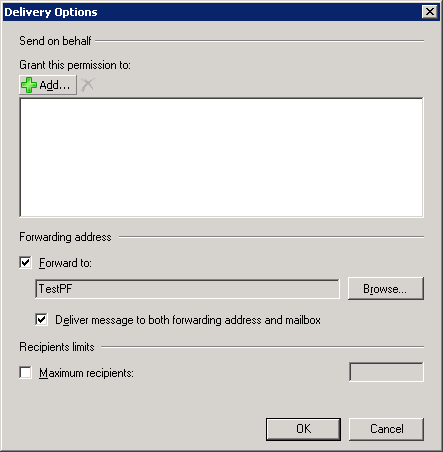
Once this is done, Delivery Options in the console does display mail being forwarded to the Public Folder.
Note, you can post to a Public Folder from Microsoft Outlook, but it should be mail-enabled to get an email address and receive (internet/smtp) email. To mail-enable a Public Folder, use the following command:
Enable-MailPublicFolder “\TestPF”
To find out how to add/remove email addresses and change the default email address for a public folder, read previous post “HOW TO: Add Email Addresses To Public Folders“.
Dear Bharat Suneja,
We are a start up company that is currently looking into building an exchange hosted service. I was wondering if you would be able to help us remotely to build the exchange and sharepoint infrastructure.
Best Regards,
Ray Rajan
416.992.6172
Email: [email protected]