
Dynamic Distribution Group is the Exchange Server 2010/2007 term for Query-Based Distribution Groups supported by Active Directory (and therefore Exchange Server 2003/2000) in Windows Server 2003. Unlike normal security and distribution groups, which have static membership (defined by manually adding users/recipients as members of the group), the membership of a Dynamic Distribution Group is determined every time the group receives a message. The (SMTP) Transport’s Categorizer component queries a Global Catalog for a list of recipients matching the LDAP filter defined in the group.
Windows Server 2003’s ADUC console allows you to preview recipients returned by the filter, by going to the group’s properties and clicking Preview. However, with recipient management moved to Exchange in Exchange 2007, this ability to preview is limited to groups created using Exchange’s “pre-canned” filters. If you’re using a custom recipient filter (Exchange 2007 uses OPATH filters), you can’t preview the recipients returned using the EMC.
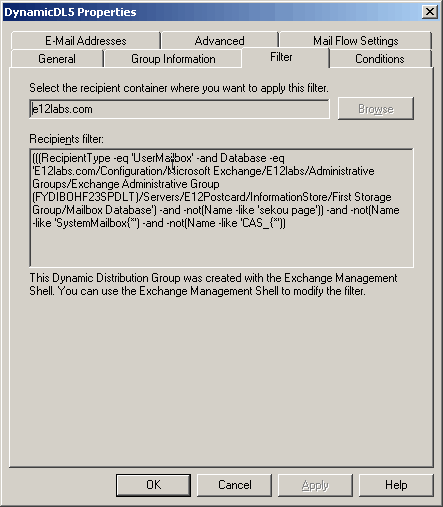
Figure 1:In Exchange 2007, you can’t view or manage custom recipient filters using the EMC
In “Adventures with OPATH: some annoyances if you’re used to LDAP“, I showed how you can preview Dynamic Distribution Group membership using the Saved Queries feature in ADUC (the Windows 2003 version).
Later I noticed the product documentation was updated to include a way to view which recipients get picked up by the recipient filter – this is easily accomplished from the shell, using the following commands:
$Group = Get-DynamicDistributionGroup -Identity “My Dynamic Group”
This stores the Dynamic Distribution Group in a variable called $Group. Now we can use the Get-Recipient command and filter the output using the recipient filter from the variable $Group:
Get-Recipient -Filter $Group.RecipientFilter
Update: You can also shorten this to a one-liner:
Get-Recipient -Filter (Get-DynamicDistributionGroup “My Dynamic Group”).RecipientFilter
If you specify a RecipientContainer in the Dynamic Distribution Group configuration to pick recipients from a specified OU or container in Active Directory, using the above method to return recipients will not be accurate because it returns recipients from the entire domain.
View Members of a Dynamic Distribution Group doesn’t mention it at the time of writing (docs are updated regularly), but the Exchange 2007 version of this doc does have an example that uses the OrganizationalUnit parameter, which is fed (value of) the RecipientContainer property of the dynamic distribution group filter.
$MarketingDepartment = Get-DynamicDistributionGroup -Identity “Marketing Department”
Get-Recipient -RecipientPreviewFilter $MarketingDepartment.RecipientFilter -OrganizationalUnit $MarketingDepartment.RecipientContainer
The code does not work if the dynamic distribution group is filtering on something that the -Filter parameter can’t search on.
For example,
new-DynamicDistributionGroup -Name “NZ Staff” -RecipientFilter { C -eq “NZ” }
The -Filter parameter can’t search on the C attribute, so the following code returns an error.
$NZ = get-DynamicDistributionGroup -Identity “NZ Staff”
get-Recipient -Filter $NZ.RecipientFilter
Cheers
Craig Beere
Same problem for me.
I can create a working DynamicDistributionGroup that includes a RecipientFilter with a RecipientType (Description -like ‘*Volunteer*’), but I get the following error
Get-Recipient : Cannot bind parameter ‘Filter’ to the target. Exception setting “Filter”: “”Description” is not a recognized filterable property.
Thanks the same though,
Bob
BTW: I guess the only way to test this is to use Message Tracking found in the toolbox.
p.s. Didn’t have this problem with Exchange 2003!
Bob
Craig,
My Recipientfilter is RecipientType -eq ‘UserMailbox’ -and CountryOrRegion -eq ‘UnitedStates’
Using the above, I can view group membership when I use:
$group = Get-DynamicDistributionGroup US-Users
Get-Recipient -Filter $group.RecipientFilter
Bob,
You’re right – Description is not a filterable property for RecipientFilter. Check the List of filterable properties doc for a list of which properties can be used in RecipientFilter.
I wanted to use this for our e-mail address Policies based on OU.
My queries kept returning TOO MANY results. I realized that I needed the -OrganizationalUnit parameter.
Example:
$Group = Get-DynamicDistributionGroup -Identity “AdminOU”
Get-Recipient -Filter $Group.RecipientFilter -OrganizationalUnit “Catmktg.com/Admin”
filtering on description works fine for me. You may want to be sure to specify the recipienttype as a user because user’s definitely have the description property. (RecipientType -eq ‘UserMailbox’)
Strange thing is if you try to preview the filter from the GUI it does not adhere to the OU you want the filter applied to. For example if you want to apply the filter to a subOU, the preview applies to the entire tree. When you actually send an email to the dynamic distribution group, it does adhere to the group, however. If you know how to easily get an accurate preview list that pays attention to the OU you want it applied to, let me know.
Get-Recipient -Filter $Group.RecipientFilter -OrganizationalUnit $_.RecipientContainer
This works well too!
” JB said…
Get-Recipient -Filter $Group.RecipientFilter -OrganizationalUnit $_.RecipientContainer”
Well that’s _very_ useful! And it does seem to work.
The only question I have is, does it _directly_ approximate the ignored “-RecipientContainer” spec?
I’m creating a targeted DDG (for use by our CEO), and it’s going to have 400-500 members. Pretty tough to pretest that, before he sends on it. Not to mention, pretty high-profile if it hits the wrong group.
I’m just trying to find somewhere where _Microsoft_ specifically says,
“Use ‘-OrganizationalUnit’ with “Get-Recipient -RecipientPreviewFilter”, to approximate the non-functional ‘-RecipientContainer’ attribute in DDG Previews.”
Thanks.
No, View Members of a Dynamic Distribution Group doesn’t mention it at the time of writing (docs are updated regularly), but the Exchange 2007 version of this doc does have an example that uses the OrganizationalUnit parameter, which is fed (value of) the RecipientContainer property of the dynamic distribution group filter.
$MarketingDepartment = Get-DynamicDistributionGroup -Identity “Marketing Department”
Get-Recipient -RecipientPreviewFilter $MarketingDepartment.RecipientFilter -OrganizationalUnit $MarketingDepartment.RecipientContainer
@Bharat Suneja: That’ll work! :) Thanks a ton for the confirmation and the info.
Thanks,
Todd
Thank you very much , it works fine.
Thanks!