
 Recently got a question about customizing the GAL and my previous post that talks about it: “HOW TO: Modify Display Template to make default email address appear in Address Book/GAL“.
In Exchange 2010/2007, the new Details Template Editor can be found in EMC | Tools. The editor makes it much easier to modify templates and give your Address Book properties pages the kind of look you want (short of adding that 5 Mb. purple bitmap file as a background and an extra-large company logo perhaps… :). Screenshots and more information about Details Templates can be found in Managing Details Templates (Exchange 2007 version here).
Adding custom attributes to a Details Template
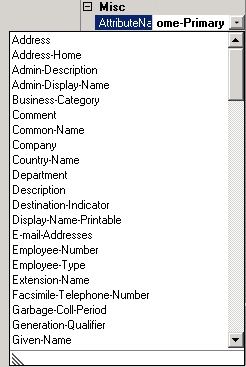
So, you’re trying to customize the properties pages of your address lists and want to add an attribute such as ipPhone. You don’t see the attribute you’re looking for. To add a custom attribute to the Outlook Details Template, you require a mAPIID for the attribute, which is an integer used by MAPI clients such as Outlook to identify Active Directory attributes.
Can you add additional attributes to the list? Or should you?
Microsoft doesn’t support adding custom attributes to Details Templates because these post the following supportability issues, as Dave Goldman explains in Adding attributes to the Exchange details templates:
- The reason why we do not offer the steps on how to do this is because it has not been tested and therefore is not supported on any version of Microsoft Exchange.
- Trying to add custom mAPIID’s causes schema modifications which can leave your system in an unstable state. These changes can and often do make more problem that what it is worth.
- Installing another software applications might modify the schema and may change your mAPIID value back to its original value thus breaking what you setup.
- We also do not support re-using existing MAPI IDs for other attributes, therefore Microsoft development *will not* fix any issues or bugs that may arise from you making this type of change.
- This is the Exchange Product Groups official stance!!
The official recommendation from Exchange product group is to use the built-in custom attributes (1-15) for this purpose. More about custom attributes in Understanding Custom Attributes.
Still want to proceed on this unhcarted course of playing with your Active Directory schema and adding MAPI IDs for your custom attributes to make them show up in Details Templates? Jim McBee has some tips in Adding attributes to the Exchange details template (revisited).
This is excellent information! It helped me a lot but I'm having another issue which is similar and I hope you might be able to assist.
Here is my situation:
I have Active Directory setup with Exchange 2007. I also have a Shoretel Phone system setup which displays information from the GAL to all users in the Call Manager. For an example it shows Home Phone, Cell Phone, Home Address etc.
I want to keep all this info in Active Directory but I want to prevent it from reaching the GAL so it does not populate the Call Manager. I only want Name and Office phone from Active Directory to populate the GAL but not the rest.
I hope I explained this well enough..
Thank you
Mark
@Mark: You can use the Details Template Editor to remove those fields from the details template of each locale. This takes care of Outlook properties. Users will be able to see the properties available in OWA.
Hi there, am new to this site….and happy to be registered )
I have a question, How can we Delegate a user/group to Edit a Custom Address List Created in Exchange 2007, from his Outlook 2007? Am basically looking for what specific permissions are required and at what levels it achieve this…
Thanks in Advance
Jax.