In my hotel room in Orlando, getting ready for an Exchange 2007 transport presentation tomorrow morning at TechMentor. When trying to telnet to the SMTP port of an Exchange 2007 Hub Transport server, I got the following error:
452 4.3.1 Insufficient system resources
Not a good thing the night before a presentation – Murphy’s law at work again!
The Application Event Log has Event ID 15002 from MSExchangeTransport saying “The resource pressure is constant at High. Statistics… “. The event goes on to tell you that inbound mail submission has stopped, and it’s due to disk space being low on the volume where the queue database is located.
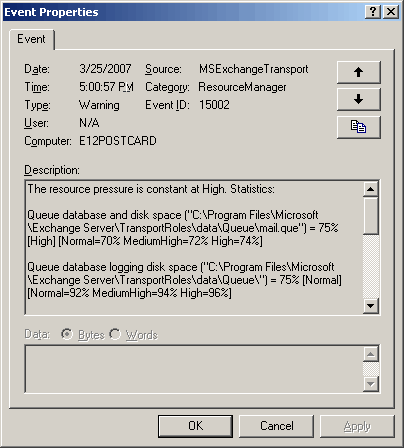
Figure 1: Event ID 15002 logged by MSExchangeTransport
What’s changed in Exchange 2007 and later?
In Exchange 2007, Microsoft wrote a brand new SMTP stack for Exchange Server instead of relying on the SMTP Server in IIS, which historically came with its own dependencies and soft spots. An important part of the change was the move of message queues to an ESE database, not very different from Exchange Server’s mailbox databases. This table shows some of the differences relevant to this issue:
| What | In Exchange 2007/2010 | In Exchange 2003 |
|---|---|---|
| Dedicated transport server roles | Hub Transport server and Edge Transport server | Front-End Server (also a front-end for other protocols – IMAP/POP/HTTP) |
| The SMTP component | Exchange has its own | Uses SMTP component in IIS |
| Transport queues are stored in… | An ESE database | .EML files on the file system |
| Location of transport queues | \Exchange Server\TransportRoles\data\Queue | \mailroot\vsi <1>\queue where <1> is the instance number of the SMTP virtual server |
| Built-in resource monitoring component | Resource Manager | None (Admins wrote scripts or used monitoring tools) |
If you’re curious to dig in further, check out the quite comprehensive Queues doc in Exchange 2013 documentation.
What’s Back Pressure?
If you’re familiar with Exchange mailbox databases, they consist of a database file and transaction logs. If the disk volume on which they reside runs out of disk space, the database dismounts.
In Exchange Server 2007 and later, the Transport service monitors system resources such as disk space and memory on Transport servers (the Hub Transport and the Edge Transport servers), and stops message submission if it’s running low on these resources. It continues to deliver existing messages in the queue. When resource utilization returns to normal, it resumes message submission. The feature is called Back Pressure (Back Pressure documentation for previous versions: Exchange 2010 | Exchange 2007 – these docs are accessible from the Other Versions drop-down from any of these links”).
In this case, Exchange required 4 GB of free disk space on the volume where the Queue database was located – I had about 3.95 Gigs. :)
Changes to Back Pressure settings in Exchange Server 2007 SP1
The Back Pressure settings in Exchange Server 2007 RTM stop inbound mailflow if free disk space is below 4 Gigs. This static threshold has been lowered in SP1 to a more realistic 500 MB.
Changes to Back Pressure settings in Exchange 2010 and later
In Exchange 2010, BackPressure settings are calculated using the formulas documented in Back Pressure, as shown in this table. High utilization is generally above 99% of total disk space, unless you’re using really small disks.
| For volume hosting the… | The formula… | If the volume size is… | High utilization is above… | Free space you need is… |
|---|---|---|---|---|
| Message queue database | 100 * (hard disk size – fixed constant1) / hard disk size | 2000 GB (2 TB) | 99%3 | 20 GB |
| Message queue database transaction logs | 100 * (hard disk size – MIN(5 GB, 3 x DatabaseCheckPointDepthMax2)) / hard disk size | 2000 GB (2 TB) | 99%3 | 20 GB |
- The fixed constant is 500 MB by default.
- The DatabaseCheckPointDepthMax key controls the total allowed size of all uncommitted transaction logs that exist on the hard drive. By default, it is 512 MB in Exchange 2010, 384 MB in Exchange 2013.
- The results of the formula are always rounded down to the nearest integer. By default, the medium level of hard drive utilization is 2 percent less than the high level. The normal level of hard drive utilization is 4 percent less than the high level.
Additionally, you may see the following events in the Application Event Log:
| Event ID | Type | Source/Cateogry | Description | When |
|---|---|---|---|---|
| 15004 | Error | MSExchangeTransport / Resource Manager | Resource pressure increased from Previous Utilization Level to Current Utilization Level. | Resource utilization level increases |
| 15005 | Info | MSExchangeTransport / Resource Manager | Resource pressure decreased from Previous Utilization Level to Current Utilization Level. | Resource utilization level decreases |
| 15006 | Error | MSExchangeTransport / Resource Manager | The Microsoft Exchange Transport service is rejecting messages because available disk space is below the configured threshold. Administrative action may be required to free disk space for the service to continue operations. | Available disk space is critically low |
| 15007 | Error | MSExchangeTransport / Resource Manager | The Microsoft Exchange Transport service is rejecting message submissions because the service continues to consume more memory than the configured threshold. This may require that this service be restarted to continue normal operation. | Available memory is critically low |
The Resolution
Many configuration options for transport servers are saved in an XML file named EdgeTransport.exe.config located in \Exchange Server\Bin\. It’s the same file name and path on both transport server roles— Edge Transport and Hub Transport.
To get Exchange transport to resume message submissions, you can use any of the following methods. All of the following require you to edit the EdgeTransport.exe.config file.
- Disable BackPressure: Although Microsoft doesn’t recommend it, it does provide a way to Disable Back Pressure
- Tweak BackPressure thresholds: Modify BackPressure parameters to more accurately define what’s high utilization for your deployment or server configurations, as explained in the above docs.
- Move the queue database to another volume: Another resolution, and the one I used in this case, was to move the queue database to another volume with ample of free space, using the following procedure:
- Add the following key in the <AppSettings> section in EdgeTransport.exe.config, as documented in “How to Change the Location of the Queue Database“:
<add key=“QueueDatabasePath” value=”D:\Queue\QueueDB” />
- Save the file and restart the Microsoft Exchange Transport service from the Services console or by using the Restart-Service cmdlet (Restart-Service MSExchangeTransport).
- Add the following key in the <AppSettings> section in EdgeTransport.exe.config, as documented in “How to Change the Location of the Queue Database“:
Message submission resumes.

{ 36 comments… read them below or add one }
Understanding Back Pressure
Thank you for your post. It helped me see why in my test virtual environment I couldn’t send not even an e-mail (and was wonderring for some time now what I did wrong .. my VM had 10 Gig hard drive and it had only 3.9 Gig free :( )
So what is the unit for PercentageDatabaseDiskSpaceUsedHighThreshold? I set it to 1024000000 (1GB?) and restarted MSExchangeTransport and still got 15002 errors with mail stuck in the outbox. I finally just turned off backpressure altogether but am wondering if I set the threshold incorrectly in the config file.
Hi TimH,
Please refer to the BackPressure documentation (also linked in the above post). Look at Table2 that lits these parameters. The valid values are listed.
As the term PercentageDatabaseDiskSpaceUsedHighThreshold states, it’s not an absolute value (in memory units) but a percentage.
Thank you for attempting, my problem was it that you solved.
Best regard
Alireza Soleimani
Thank for your Post.Previously i am not able send mails after reading your post i rectified problem.Thank you very much.
This posting was a godsend, it resolved an issue halting email between by Exch2007 & 2003 Interop Connector!
Thanks!
Thanks! Moving the queue DB and logs fixed the issue for me as well.
Hi Bharat, thanks for your blog. It has been interesting reading. I have a similar issue and at this point am unsre if it is related to system resources or lack of. Here is the issue:
From Exchange 2007 server i cannot telnet to any remote domains on port 25.NSLOOKUP queries resolve DNS and MX records ok for these domains from the exchange server. From a second server on the same network i can telnet to domain mx records on port 25 without any issues. It is only from the exchange server i cannot telent out to port 25. I can ping the domain names ok from the exchange server so my DNS looks ok. There is no AV or Firewall software located on this server.
I noticed the following error in the event log however.
Your system is low on virtual memory. Windows is increasing the size of your virtual memory paging file. During this process memory requests for some applications may be denied.
Our paging file utilisation was at about 90% but have increased paging file in accordance with nest practice analyzer ( 8200mb )I have at least 50GB free disk space. Has anyone seen this before? Is it possible the SMTP stack is corrupt? I can recieve e-mail ok but have had to use IIS SMTP connector on another box to deliver e-mail. Any ideas??
Solved the issue for me in EBS, TMG server, moved the Queue to a different volume as per the MS Article, and queues are now operational without the BackPressure Issue.
Thanks Bharat for your post. This came in really handy this morning!
Very useful tip. Thanks a lot.
very cool post
Very good post. Thanks a lot.
Woot! Thanks, that saved my bacon. I was able to get the fix in before any of our lawyers saw that they hadn't received emails for 1/2 an hour….
You are a star
Thanks for the post. Fixed out issue as well. Although interestingly I got no errors in the event logs, just the SMTP error (452 4.3.1 Insufficient system resources) when I used telnet to connect directly to the SMTP interface on the exchange server and did a “mail to:” command.
Thanks so much! Worked like a charm.
great work friend … thank you very much..
THANKS! Solved my problem…. my problem was memory usage was up over 95% (the threshold was 94%)…. Added more RAM and problem solved.
THANKS!
It worked! Yes I echo the other’s sentiments. Thank you for writing the article.
My issue was due to system drive free space. It had just inder 1.9GB free. Disk cleanup free’d enough space to start processing external mail again. Internal mail was working normally.
I’ve since moved the DB and logs to another drive with plenty of space.
Please Try this First and then try the other methods
In this case, Exchange required 4 Gigs of free disk space on the volume where the Queue database was located – I had about 3.95 Gigs. :)
Thanks & Regards
Sachin Mulekar
I had the exact same problem, searched for hours but my Exchange had enough free space on all drives, no errors in the log – I couldn’t find the problem!
Then I realized that our firewall is “Forefront Threat Management Gateway” 2010 with “Forefront Protection 2010 for Exchange Server” installed.
So some kind of transport is running on our TMG which had very low free space on the C: drive.
Increased the free space, restarted – and now everything works fine again.
So don’t forget about TMG if you run into this error!
r you dumb ? It’s not murphy’s law .. it’s Microsoft .. ha aha ha
Thanks for this post. We had this issue today. I’ve moved the Queue to another disk with more disk space. Resolution 3 worked fine for me.
Thanks a lot for this post.
We moved de db and everything ok.
Greetings.
After clearing some space in c drive the problem is solved.
This worked for me. I had 7gb free on each of my two partitions, so i looked at virtual memory. It looked like very little was left, didn’t do the math, but changed the default threshold from 94 to 96 and restarted the hub transport service and poof. Mail started flowing in. I’ll have to look into a more permanent solution
I tried this solution and was getting an Event Log error stating the path didn’t exist. So I moved the TransportRoles folder to the path I had referenced in EdgeTransport.exe.config (on a volume having more space).
Big mistake. Next Event Log error was re: unable to create log file (in original path in TransportRoles folder). So I copied the folder back to original location.
Now, I get event 16023: Microsoft Exchange couldn’t start transport agents. The Microsoft Exchange Transport service will be stopped. Exception details: No valid agents.config file was found in ‘C:\Program files\Microsoft\Exchange Server\TransportRoles\Shared\agents.config’. The default configuration for transport agents can be recovered by running ‘scripts\ReinstallDefaultTransportAgents.ps1′. —> System.IO.FileNotFoundException: Unable to find the specified file.
— End of inner exception stack trace —
at Microsoft.Exchange.Data.Transport.Internal.MExRuntime.MExConfiguration.Load(String filePath)
at Microsoft.Exchange.Data.Transport.Internal.MExRuntime.MExRuntime.Initialize(String configFile, String agentGroup)
at Microsoft.Exchange.Protocols.Smtp.MExEvents.Initialize(String configFilePath)
at Microsoft.Exchange.Transport.Components.SmtpMExRuntimeLoader.Load()
—————
Having run the suggested script and still getting the same message, I’m wondering if it is necessary to re-register the dlls referenced in that agents.config file, or if there is some other explanation. It is strange because the file did exist (after copying it back) and certainly the default configuration exists after running the script. Yet the message continues to say FileNotFoundException.
Solved it myself– the Exchange Transport service was running with NT AUTHORITY\NetworkService. When I moved the files back and forth I lost the permissions for that account. Trying to re-add them though, I couldn’t find NetworkService. I had to enter “Network Service” (with a space).
Hope this helps someone with a similar problem.
thank you very much for this Article. saved the Day.
question
can I change the queue live? or should I shutdown exchange services before making the queue change?
the exchange database is going to keep growing so it makes no sense for me to keep the queue on the same drive.
but MGMT is not so sure to make the change now.
To move the queue, you’ll need to restart Transport service. You do not need to stop all services or mailbox databases. See Change the location of the queue database.
Note, in Exchange 2013 the transport queue is also a database. Exchange will create a new database in the new path.
hello, i got the problem today, could not receive mails any more. sending mails was no problem. on volume there have been “only” 50GB free disk space, where total space is 1,82TB. i moved some data to another volume, in the end i had about 100GB free disk space on the volume. than receiving mails was no more a problem, all works fine. but i absolutely don´t unterstand why there is, in my case, about 100GB of free disk space necessery that i can receive mails,or, in other cases, the error display above is not appearing. can somebody explain, why there is so much free disk space needed? is 50GB free disk space not enough? thanks, kind regards, andreas
Based on the formula used to calculate BackPressure settings, you would require approx 99.97 GB of free disk space for a drive of that size (1820 GB). It’s close to or little over 5 percent.
You can configure the settings.
The post has been updated to include the formulas used in Exchange 2010 and later.
This happens to me yesterday. This error happens because the lack of free space to make the succesfully delivery of the emails.
So the resolution is:
1 Check the Local space for the logs and for the edb (files on the exchange server)
To meet this you can use this powershell script: https://gallery.technet.microsoft.com/office/What-is-the-size-of-my-0e1993a7
Please do not modify exchange server edgetransport.exe.config files since it’s a bad practice, it’s just a workaround is not a solution.
2. Enable circular logs on the Exchange server Databases and then “Unmount” and “Mount” them again. you will get your emails flowing really fast.
3. I will recommend also using my script Gives you the location of those Database in the Filesystem (Path) you will need to create a backup (enabling the “VSS Full Backup” option in the VSS Settings tab) as showed here to clean up even more the logs space on the exchange DB (https://thepracticalsysadmin.com/use-windows-backup-to-truncate-logs-in-exchange-2010-with-dag-configuration/)
Jose Gabriel Ortega C
MCSE/MCP Messaging /Server Administrator
Top rated Upwork Freelancer
{ 6 trackbacks }