If you’re using Exchange Server 2007 in a topology with an Edge Transport server, the anti-spam agents – Connection Filtering, Content FilterSender ID, Sender Filter, Recipient Filter, and Protocol Analysis – are installed on the Edge Transport server. You don’t need these agents installed on the Hub server(s).
In environments without an Edge Transport server, you can install antispam agents manually on Hub Transport servers.
To install antispam agents on a Hub Transport server:
- Start the Exchange Management Shell (EMS)
- Navigate to the “\Exchange Server\Scripts” folder (by default C:\Program Files\Microsoft\Exchange Server\Scripts)
- Run the Install-AntispamAgents script:
.\install-antispamagents.ps1
Once installed successfully, the command output will list each agent installed, whether it’s enabled or not, and its priority [see screenshot].
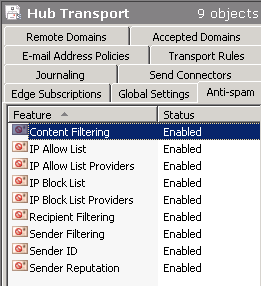
Figure 1: After you install antispam agents on an Exchange 2007/2010 transport server, the Anti-spam tab becomes visible in Organization Configuration > Hub Transport node in the EMC.
After the antispam agents are installed, you can see the Anti-spam tab in Organization Configuration | Hub Transport node in EMC.
If your console was open during installation, you will need to restart it.
Routing Internet mail to the Hub Transport server
In deployments without an Edge Transport server, you can either route inbound mail through your service provider, or configure Hub Transport servers to receive inbound email directly. See previous post “Exchange Server 2007: Internet email without Edge servers“.
Disable or Uninstall antispam agents
You can disable each antispam agent by using the corresponding Set command. For example, to disable the Content Filter agent, use Set-ContentFilterConfig -Enabled $false. You may need to do thist temporarily when you’re troubleshooting an antispam issue.
How do you remove the antispam agents completely? You guessed it – there’s an Uninstall-AntispamAgents.ps1 script in the \Scripts directory.
Related posts:
– Exchange Server 2007: Internet email without Edge servers
– Exchange Server 2007: Managing And Filtering Anti-Spam Agent Logs
– Exchange 2007 Content FIlter: The Whitelist Is Here!
– Exchange 2007 Content Filter: How to move messages to Junk Mail folder
– Exchange Server 2007: How are RBLs performing?


{ 9 comments… read them below or add one }
I did this.. it added the tabs etc, but when i add words to the Content Filtering they do not seem to get blocked.
I added the get spammed word “viagra” and using my hotmail i sent a message with the word viagra in it.
This email was still sent to me and not put in the spam mailbox which is the Action.
I have NO exceptions.
So not sure why this doesnt work in the Anti-Spam, all the other parts of the anti spam seem to function ok.
This does not work any longer.
What doesn’t work – installing anti-spam agents on the hub?
Bharat
Hi,
I went o directory :
c:\Program Files\Microsoft\Exchange Server\Scripts
I launch the script :
.\install-AntispamAgents.ps1
Then it open “notepad” with :
The script in !
Not executed it !
PS : excuse for my English, I’m French ;)
Bye
I am using exchange 2007, and antispam installed on it. Antispam worked for weeks time and then all of sudden transport server is not working now. Here is the eventlog. If anyone can help to find solution to this problem it will be quite helpful.
Microsoft Exchange couldn’t start transport agents. The Microsoft Exchange Transport service will be stopped. Exception details: Failed to create type ‘Microsoft.Exchange.Transport.Agent.ContentFilter.ContentFilterAgentFactory’ from assembly ‘D:\Exchange\TransportRoles\agents\Hygiene\Microsoft.Exchange.Transport.Agent.Hygiene.dll’ due to error ‘Library not registered. (Exception from HRESULT: 0x8002801D (TYPE_E_LIBNOTREGISTERED))’. : Microsoft.Exchange.Data.ExchangeConfigurationException: Failed to create type ‘Microsoft.Exchange.Transport.Agent.ContentFilter.ContentFilterAgentFactory’ from assembly ‘D:\Exchange\TransportRoles\agents\Hygiene\Microsoft.Exchange.Transport.Agent.Hygiene.dll’ due to error ‘Library not registered. (Exception from HRESULT: 0x8002801D (TYPE_E_LIBNOTREGISTERED))’. —> Microsoft.Exchange.Data.ExchangeConfigurationException: Library not registered. (Exception from HRESULT: 0x8002801D (TYPE_E_LIBNOTREGISTERED)) —> System.Runtime.InteropServices.COMException (0x8002801D): Library not registered. (Exception from HRESULT: 0x8002801D (TYPE_E_LIBNOTREGISTERED))
at Microsoft.Exchange.Data.Transport.Interop.UnsafeNativeMethods.CoCreateInstance(Guid rclsid, Object pUnkOuter, UInt32 dwClsContext, Guid riid)
at Microsoft.Exchange.Data.Transport.Interop.ComProxy.CreateComObject(Guid guidClass)
at Microsoft.Exchange.Data.Transport.Interop.ComProxy..ctor(Guid guidClass)
at Microsoft.Exchange.Transport.Agent.ContentFilter.ContentFilterAgentFactory.InitializeFilter()
— End of inner exception stack trace —
at Microsoft.Exchange.Transport.Agent.ContentFilter.ContentFilterAgentFactory.InitializeFilter()
at Microsoft.Exchange.Transport.Agent.ContentFilter.ContentFilterAgentFactory.Configure(Boolean onStartup)
at Microsoft.Exchange.Transport.Agent.ContentFilter.ContentFilterAgentFactory..ctor()
— End of inner exception stack trace —
at Microsoft.Exchange.Data.Transport.Internal.MExRuntime.FactoryTable.CreateAgentFactory(AgentInfo agentInfo)
at Microsoft.Exchange.Data.Transport.Internal.MExRuntime.FactoryTable..ctor(IEnumerable agents)
at Microsoft.Exchange.Data.Transport.Internal.MExRuntime.RuntimeSettings..ctor(MExConfiguration config, String agentGroup)
at Microsoft.Exchange.Data.Transport.Internal.MExRuntime.MExRuntime.Initialize(String configFile, String agentGroup)
at Microsoft.Exchange.Protocols.Smtp.MExEvents.Initialize(String configFilePath)
at Microsoft.Exchange.Transport.Components.SmtpMExRuntimeLoader.Load()
For more information, see Help and Support Center at
the reason it opened in notepad was because you need to run it in the exchange console and not from a cmd prompt
Worked great for me, actually too great. Blocked all incoming email so I had to disable most of the features.
lolo check
http://support.microsoft.com/kb/555924
Worked great for me too. Thank you very much!
{ 2 trackbacks }