
This is one of the more frequently asked questions in different forums and still a major annoyance – how do I send as an alternate address (aka proxy address or alias)?
In most organizations, users have multiple email addresses to meet business requirements such as multiple business units, business names and domain names, mergers, acquisitions or spin-offs, or multiple standardized address formats. Exchange Server and Exchange Online make it easy to add additional email addresses for mailboxes or other types of recipients using these two methods:
- Automatic, policy-based email addresses Use Email Address Policies in Exchange Server 2013/2010/2007 and Exchange Online for scenarios where all or many users require multiple standardized email addresses, for example: FirstName.LastName@yourdomain.com and FirstInitialLastName@yourdomain.com. In Exchange 2003, this is done using Recipient Pollicies
- Manually add email addresses to a single user by using the E-mail Addresses tab in the Exchange Admin Console (EAC) in Exchange 2013/Exchange Online, the EMC in Exchange 2010/2007, or Active Directory Users & Computers (ADUC) in Exchange 2003. See HOW TO: Add additional email addresses to a mailbox.
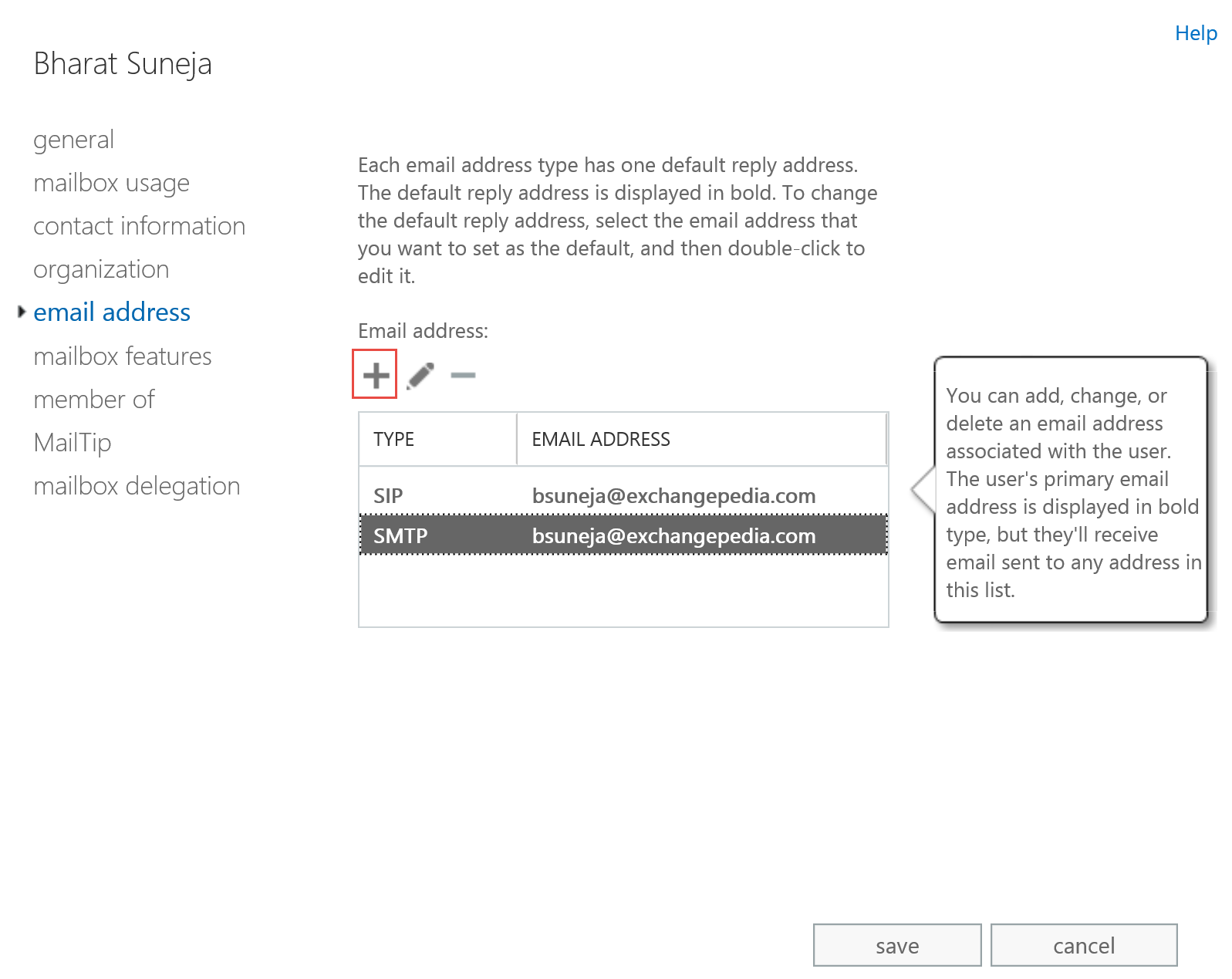
Figure 1: Add an email address on the email address page in Exchange Admin Center (EAC)
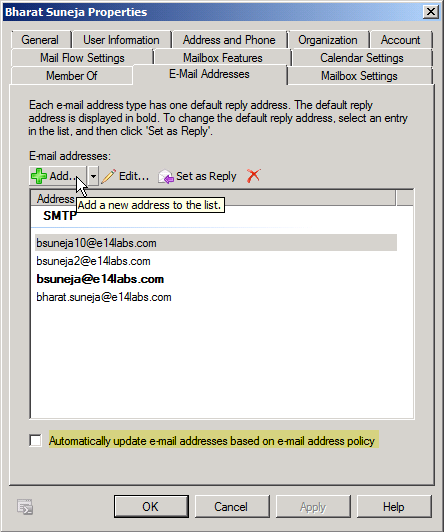
Figure 2: You can add additional e-mail addresses for a mailbox from the E-mail Addresses page in mailbox properties
Receiving and sending messages using additional email addresses
The email addresses are stored in a recipient’s proxyAddresses attribute in Active Directory. You can specify one email address as the user’s primary address. The other email addresses are commonly known as aliases or proxy addresses. Recipients receive inbound email addressed to any of the email addresses in that attribute. (To receive messages from external senders to your servers, you’d still need the registered domain name(s), MX record(s) pointing to your server(s), firewall rule to allow inbound SMTP traffic to your server(s), et al).
You can use any of your email addresses to send a message, but thanks to the voodoo magic that occurs between Outlook and Exchange, the From: address automatically gets resolved to your primary email address.
But sending messages using any of those proxy addresses is a different story. When composing a new message, you can specify any of your email addresses (which exist in the proxyAddresses attribute). However, thanks to the voodoo magic that occurs between Outlook and Exchange, the From: address you specify automatically gets resolved to your Display Name (or more accurately, your user account) and gets sent using your primary email address. This is the address displayed using (upper-case) SMTP: in the E-mail Addresses tab.
This behavior also manifests itself when replying to a message that was received on an address other than the primary email address.
How do Outlook and Exchange behave?
Outlook 2010 allows you to specify a different from address when composing a message. The following screenshots are from Outlook 2010 but Outlook 2013 (and OWA) behave the same way with email aliases or proxy addresses.
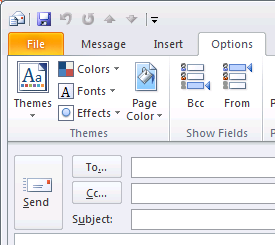
- The From: field isn’t visible when composing a new message. To make it visible, go to the Options section and click From.
- Click From and select the alternate email address.
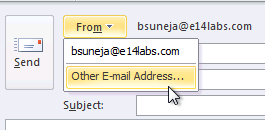
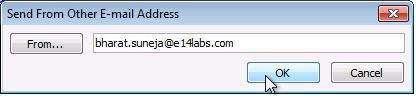
If the address isn’t available in the list, select . - In the Send From Other E-mail Address window, type the email address in the From field.
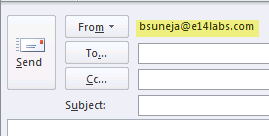
- The result: Outlook 2010 changes the From address to the default email address:
Workarounds for sending mail using a proxy address
There are workarounds for sending email using a proxy address or alias, but they are as annoying as the problem itself.
-
Using additional mailbox or recipient(s)
- Create a new mailbox (you can also use other type of recipient objects such as Distribution Groups for this, but for this post I’ll assume you’re using a mailbox) for each address you want to use to send outgoing mail.
- Ensure this address is set as the primary address of the new mailbox.
- Assign the user Send As permission on the new account(s)
- When sending a new message, or replying to a received message, the user must manually populate the From: field in Outlook with the Display Name or SMTP address (or any other attribute that can resolve to the new account)
- Additionally, if you’re using a mailbox-enabled account for this purpose, the user can also open the additional mailbox in Outlook if they’re assigned Full Access mailbox permission to this additional mailbox, along with their primary mailbox. See HOW TO: Grant Full Mailbox Access permission.
- Alternatively, you can also redirect or forward inbound mail to the user’s primary mailbox by modifying Delivery Options in the properties of new recipient(s) created for this purpose.
-
Using SMTP clients
SMTP clients such as Outlook Express can be configured to send using the alternate email address. This can be equally annoying because every time a message needs to be sent as an alternate address, you will need to fire up Outlook Express (or your SMTP client of choice) to send the message.
-
Using Address Rewriting
On Exchange 2010/2007, you can use address rewriting. See Understanding Address Rewriting in Exchange 2010 docs. On Exchange 2003/2000, you can use the Microsoft Exchange Server Address Rewrite Tool to rewrite email addresses. Of course, these are administrator-controlled and applied on transport servers, so they apply universally to all messages that match rule conditions, and are intended to be used in scenarios such as mergers or company name and domain name changes that happen across an organization.
-
IvaSoft ChooseFrom – an Exchange Server add-on
IvaSoft makes nifty utilities for Exchange/Outlook that allow you to accomplish tasks that Exchange/Outlook do not allow you to do natively. Their ChooseFrom utility can be used to choose from any address listed in the proxyAddresses attribute, without the pain of the workarounds mentioned above. It uses a transport agent on Exchange server, and is licensed per server.
ChooseFromOWA, another tool from IvaSoft, allows you to use Outlook Web Access (OWA) in Exchange 2007/2010 to send messages using any of your proxy addresses. It also uses a transport agent.
Needless to say, you can’t install these server-side add-ons in Exchange Online.
-
Proxy Manager – an Outlook add-in
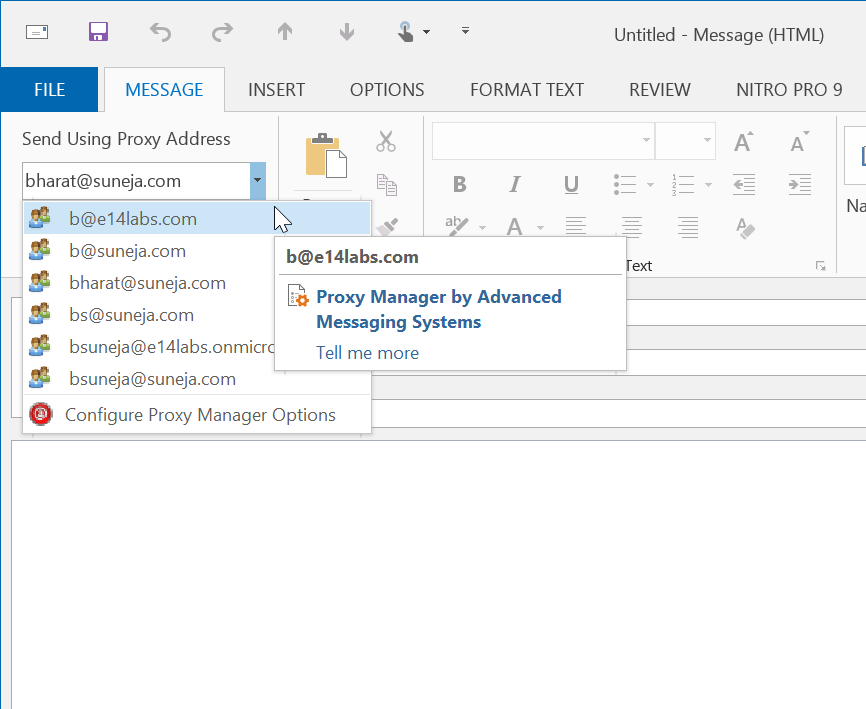
Figure 2: Proxy Manager is an Outlook add-in that allows you to send using a proxy addressIf you don’t want to install an add-on on Exchange Server, check out Proxy Manager, an Outlook add-in created by Exchange MVP Dmitry Streblechenko.
Proxy Manager allows you to choose a proxy address when composing or replying to messages. It uses SMTP to send messages. Like most SMTP clients, it requires a one time configuration where you select or specify an SMTP server. The good part is once you do this it’s easy to send messages using any of your proxy addresses from within Outlook, without having to fire up another email client.
There’s no solution to this issue in Exchange Server 2007/Outlook 2007 as well (or in Exchange 2010/Outlook 2010 and Exchange 2013/Outlook 2013… this post is updated every few years). IvaSoft has released ChooseFrom for Exchange Server 2007/2010 and ChooseFrom for Microsoft Exchange Server 2013 v 1.0.0.10.
(As with most third-party software, install and test in a lab environment before you decide to install it on a production server.)
A possible 4th option is to have a distribution list that you specify in the “From” textbox and you previously have given rights to the user to send from that distribution list.
I use outlook as my RSS reader and all your Posts show up as 1/1/2007. No other blog does this, any reasons why?
Murray,
Just noticed that myself – deleting the feed in Outlook and adding it again resulted in all posts dated 12/31/2006!
– Checked the feed XML file which is produced automatically by Blogger – and that looks OK.
– Subscribed to the feed using Google Reader and My Yahoo – posts show up with the correct date.
Looks like it’s an Outlook 2007 issue. Please let me know if you find this happening with other readers as well, or a way to fix this with Outlook.
Bharat
I’ve been looking into a related problem for a customer for some time now and am completely stumped… I’ve added the alternating e-mailadresses through extra accounts and have set the user rights accordingly (the send as). The strange thing is, when i test everything through rpc over https in outlook 2003, everything seems to be working fine, i’m sending mails back and forth and all is well. The problem arises when the customer logs in to his computer on their network and starts up Outlook 2007. When she tries te send a mail using send as she always imidiatly gets an NDR stating that she doesnt have the permissions to send mail to the recipients. Anyone that can point me in the right direction please?
Kind regards,
Phil
I have implemented an solutuion to this for myself that works for mail coming from any source (OWA, Outlook, SMTP). The from address is specified in the subject using a special format “{{From:Name}} Subject” or “{{From: email_address_here}} Sucject”, and is then removed by the exchange server before sending out. If anyone is interested in purchasing, I am willing to modify to your exact situation, unlimited usage license for between $50-$100 depending on the features you need added.
Easy way to solve this, is to create a POP account for the secondary Email alias. Then go into Send/Receive settings and disable Receive new items on the POP account. Otherwise you will get crazy amounts of doubled emails. But now you will be able to select either account to send from, with no problem. This will only work from Outlook 2k3 or 2k7. No dice on OWA, for that you will have to use an aftermarket app.
We are looking for a solution to this issue as well. We need to be able to sen out email as the alias and can’t create seperate email accounts or POP3 accounts. I would be interested in the solution you are using.
I am using one mailbox for many shared folders, so that my users don’t have to have a lot of different seperate mailboxes open at once. I am creating equipment resource mailboxes to use as forwarders, and setting the mail flow properties to forward to the shared mailbox without keeping a copy, and writing a rule in the shared mailbox to file into the proper shared folders by looking at the From address.
Then the users can use one mailbox, but we aren’t limited in using the alternate email addresses, as SendAs rights can be set to the resource and assigned to a group. Works great.
HOWEVER – I’m seeing the same issue that Anonymous from August 21, 2007 is having, and it’s driving me nuts. If anyone knows of a solution, it would be great to hear of.
http://msexchangegeek.com/2009/06/19/using-secondary-email-address-to-send-emails-in-exchange-2007/
[…] Once you’ve added additional email addresses for a recipient, the next common question is: Can the user send and receive email using this new email address? Find out more in HOW TO: Send as alternate email address. […]
I have outlook 2010 and no exchange server. I have a similar problem in that I set up my [email protected] to receive using a pop account but to send I use my smtp.google account. Despite setting my reply to address as [email protected] it always shows up as [email protected]. Very unprofessional. Any ideas on how to solve this?
I have created a large number of additional E-mail addresses for my users that are now successfully showing as secondary or extra E-mail addresses. I have created approximately 900 of these addresses using a CSV file. This has worked fime and the users can now receive E-mails sent to these new addresses. My next task is to make these secondary addresses the primary address so that when a user sends externally it appears to come from this new address. Is there any easy way i can script this change ie by feeding in a csv file with the secondary addresses and a command to make them all primary?
Hurrah, that’s what I was looking for, what a material!
existing here at this web site, thanks admin of this website.
You can also use Proxy Manager (http://www.dimastr.com/proxyman). It is implemented as an Outlook 2010/2013 addin, so everything is done on the client side.
Perfectly composed content material, regards
for information.
Thanks for writing this up. In the past I’ve gone through all these steps myself and ended up using multiple mailboxes after pulling my hair out and calling Microsoft lots of names.
You’d thought Exchange and Outlook would have had this functionality it’s not like its not something people wouldn’t want to do and the product is very mature. What really annoys me is Outlook, if you did try and add multiple mailboxes separately into outlook using the same mailbox server then the saved credentials for the last account will be used which causes the other mailboxes to fail to login. If you don’t save the credentials then it will work but you have to type them in each time you load outlook. (I was doing this or tried this is to get around the sent emails going into the primary mailbox or it not choosing the correct email address to reply to emails sent to the non main smtp as the from field isn’t the solution I wanted to use but have to due to Outlook). I tried a third party exchange compatible email client and it can do this IE save the credentials and not screw up. The issue is how Windows stores credentials. Perhaps using ChooseFrom is the best solution to a problem that shouldn’t exist, I’m not surprised after all it’s a Microsoft product.
I also recommend using UPN’s so that the usernames for the mailboxes can be the email addresses.
There exists a tool named “ChooseFrom 365” for Office 365/Exchange online:
http://ivasoft.com/choosefrom365.shtml
Regards,
Victor Ivanidze
[…] Send as alternate email address in Outlook and Exchange […]