
You’ve setup Exchange Server 2007, and configured the shiny new Content Filter agent (CFA), which is more than just a rewrite of the equally loved and hated Intelligent Message Filter (IMF) from Exchange Server 2003. How do you configure it?
Spam Confidence Level (SCL) Thresholds in Exchange 2007/2010
The CFA has the following three thresholds, which are equivalent of Gateway thresholds and (gateway) actions in IMF in Exchange 2003:
- SCLDeleteThreshold
- SCLRejectThreshold and
- SCLQuarantineThreshold
- SCLDeleteThreshold: Messages with SCL equal to or higher than the SCLDeleteThreshold are deleted silently. To enable the SCLDeleteThreshold:
set-ContentFilterConfig -SCLDeleteThreshold 8 -SCLDeleteEnabled:$true
- SCLRejectThreshold: Messages with SCL equal to or higher than the SCLRejectThreshold are rejected during the SMTP session, after the data is received. In this case, senders get a NDR. To enable the SCLRejectThreshold:
set-ContentFilterConfig -SCLRejectThreshold 7 -SCLRejectEnabled:$true
In the above case, Exchange doesn’t accept the message. After the data is received, it responds with a 500 5.7.1 error and a rejection response (by default this response is: Message rejected due to content restrictions. This rejection message can be configured using the following command (response message used here is for illustration, not a real suggestion – Bharat) :
set-ContentFilterConfig -RejectionResponse “Stop spamming you *****!”
The actual NDR is generated and sent to the sender by the sending host. What the sending host will see after the message content is sent (and if you actually modified the rejection response based on my example :)
500 5.7.1 Stop spamming you *****! - SCLQuarantineThreshold: Messages with SCL equal to or higher than the SCLQuarantineThreshold are delivered to the quarantine mailbox, provided you have one configured. To enable the SCLQuarantineThreshold and configure a quarantine mailbox:
set-ContentFilterConfig -SCLQuarantineThreshold 6 -SCLQuarantineEnabled:$true -QuarantineMailbox:[email protected]
- So where’s the equivalent of IMF’s Store threshold, used to move messages to users’ Junk Mail folder?
It’s called SCLJunkThreshold and it’s configured in the Organization configuration. It can be set using the Set-OrganizationConfig command:
set-OrganizationConfig -SCLJunkThreshold 5
Setting SCLJunkThreshold not intuitive?
Before you jump to conclusions about this being counter-intuitive or confusing, which it may be, consider this – it’s in response to the different server roles in Exchange Server 2007.
The gateway actions – delete, reject and quarantine – can be thought of as message transport actions and thus applicable to transport server roles – the Edge Transport server and/or the Hub Transort server (if you have antispam agents enabled on the Hub). Moving messages to users’ Junk Mail folders can be thought of as something that happens at the Store, performed by the Mailbox Server role.
SCLJunkThreshold and Edge Transport servers
Another aspect to consider when setting the SCLJunkThreshold – if you’re in a topology with an Edge Transport server, the SCLJunkThreshold configured on an Edge Transport server doesn’t impact anything. You must have the SCLJunkThreshold configured on your Exchange Org. The Edge Transport server is not a part of it.
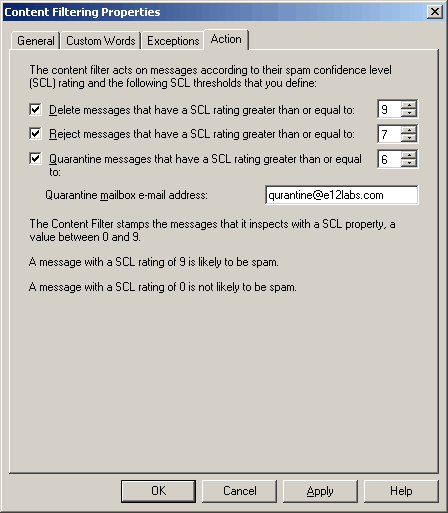
Figure 1: Exchange Server 2007’s Content Filtering agent can be configured with the equivalent of all 3 Gateway actions available in Exchange Server 2003’s Intelligent Message Filter (IMF): 1) Delete messages 2) Reject messages and 4) Quarantine messages
This is an improvement over IMF, which had only one gateway action (and one corresponding gateway threshold). The Content Filter agent allows the flexibility of enabling all three actions on the gateway. The rule is: SCLDeleteThreshold > SCLRejectThreshold > SCLQuarantineThreshold.
To get a list of all three SCL values and whether each action is enabled or not, use the following command:
get-ContentFilterConfig | Select SCL*
The default SCL thresholds
By default, the SCLJunkThreshold is set to 4. If you have an existing Exchange 2003 SP2 server installed and you haven’t tweaked the Store threshold, IMF v2’s default Store threshold of 8 is used. This is what you’ll see in the Org’s SCLJunkThreshold.
Given that the SCLRejectThreshold is set to 7 by default, messages will not move to users’ Junk Mail folder unless the SCLJunkThreshold is lower than the transport thresholds (i.e. the Delete, Reject and Quarantine thresholds).
How the Junk Mail threshold is calculated
Unlike the transport actions of deleting, rejecting, and quarantining messages, which check for SCL equal to or higher than their respective thresholds, for moving messages to Junk Mail folder the Store checks for SCLs higher than the SCLJunkThreshold. This is consistent with the behavior of IMF in Exchange Server 2003 (as mentioned in IMF Confusion – Store threshold rating text in UI).
If you want to disable rejection of messages with SCL of 7 or above, use the following command:
Set-ContentFilterConfig -SCLRejectEnabled:$false
I have been racking my brain the past couple days on finding the Junk threshold. Thanks a lot for this post!!
Thank you for this great post, and the formatting as well makes it easy to read.
Thank you, you saved me a lot of time.
Fantastic information! It always helps to find the key items all of us Exchange Admins need. One note: to check the current value of SCLJunkThreshold run the following:
Get-OrganizationConfig
The value for SCLJunkThreshold will be listed.
So does the CFA work if you do not have an Edge Transport? In my single E2007 environment, when I set SCLJunkThreshold to anything other than 8, ALL junk email just disappears, it never makes it into the Junk Mail folder in Outlook.
Have you installed anti-spam agents on Hub Transport server(s)?
HOW TO: Install anti-spam agents on Hub Transport server
If agents are installed on the Hub:
Exchange 2007 Content Filter: How to move messages to Junk Mail folder
Excellent information
Hi guys,
I work for an Hosted Exchange 2007 company and we're modifying the way our incomming emails are filtered.
We have a third-party solution that scan all our incomming emails and we want to have flagged emails (using Transport Rules to set the spam confidence level) moved into Junk Email folder. So to resume, when the spam confidence level is X, we want those emails moved to Junk Email folder.
For now the only way we were able to make it work is by modifying the Junk E-Mail options into OWA (Automatically filter junk e-mail).
As you can understand, we can't ask to our 70000 users to change this setting. So we want to have a way to do it server side.
I have take a look at the Glen script (http://gsexdev.blogspot.com/2007/07/turning-on-filter-junk-email-in.html) but I'm surprise that this is the only way to have the flagged emails move to the Junk Email Folder..
I have also try to set the SCLJunkEnabled to True on 1 test mailbox using this command: Set-Mailbox -SCLJunkEnabled $True -SCLJunkThreshold 7
It's not working.. again I were able to make it work is by modifying the Junk E-Mail options into OWA.
Is there something I don't understand..?
Do you know how we can have flagged emails move to the Junk Email Folder?
Thanks for your help.
Karl
Hi, Can anybody tell me who and how SCL rating of an email is decided.
Thanks for the blog.
If all I want is to have server-side moving spams to Junk Mail folder, do I still have to:
1. run the "install-AntispamAgents.ps1" command?
2. tell every user to log into OWA and enable some junk mail option?
I'm having legitimate emails to customers marked as spam. How do I prevent this happening?
@Grahamrobinson: Users can add customers to safe senders, you can add customer domain or IP address to whitelist / ip allowed list.
Exchange 2007 Content FIlter: The Whitelist Is Here!
I had another Problem with a migrated mailbox. The Mailbox was exported with Exmerge – on a MSX 2003 – and included Hidden-Files. After import on a MSX 2007 the Junk-Mails didn't go to the Junk-Mail-Folder. Changing the Junk-Mail-Setting in OWA doesn't fix it.
The Problem was the existing Hidden-Message that contains the Rules for the movement. After deleting this Message everything works great.
To delete this Hidden-Message i find this:
http://www.outlook-tips.net/howto/fix_junk.htm
I didn't know if there is an other way to delete this Message.
Regards
Ingo
I ran the command “Get-ContentFilterConfig | select SCL*” and got the following:
SCLRejectThreshold : 7
SCLRejectEnabled : False
SCLDeleteThreshold : 9
SCLDeleteEnabled : False
SCLQuarantineThreshold : 9
SCLQuarantineEnabled : False
I’m trying to disable SCL completely (we have a third party product and don’t want to confuse ourselves in the future if we have spam filtering issues) and trying to figure out which is the culprit (btw, how can I totally disable all of the anti-spam functionality in Exchange 2010?).
Now, even though I have all of these set to FALSE a test message sent in is still marked as a 7 and put into my junk folder. Do I need to restart a service or something to use the new settings? Is there something else I’m missing? The headers look as follows:
X-ESET-AS: SCORE=77
X-MS-Exchange-Organization-SCL: 7
X-EsetResult: clean, is OK
X-EsetId: 84102922B13A7C3BD457
What do I do? Thanks!
You can disable the Content Filter agent:
Set-ContentFilterConfig -Enabled $falseOr disable all anti-spam agents.
You can also uninstall anti-spam agents from your transport server. See Install anti-spam agents on Hub Transport server.
Hi,
i just want to is there any difference in Exchange 2007 IMF and Exchange 2010 IMF ? i have a option….for which IMF should i go ?
Not sure what you mean. You can’t install an Exchange 2007 antispam filter on Exchange 2003 or a 2003 filter on 2007. Install the one that’s compatible with your version of Exchange Server.
I did all the settings. however. spam e-mails coming in my inbox. why?
Who can help me
[email protected] pls helpme
Thanks for the post which is right to the topic!