
Category: AI, Hardware, Home Lab
I’ve been running servers at home since before most people had broadband. Cisco routers, managed switches, 1U rack servers humming away in a dedicated rack — the whole setup. I knew exactly what a 24-port Catalyst sounded like at 2 AM. My wife tolerated it for years. Then she didn’t. The decibel ban came down, the rack got decommissioned, and I’ve been making different hardware choices ever since.
Which is why, when my new Mac Mini order got pushed to August, I posted about it on LinkedIn — half frustrated, half amused. The response was illuminating.
The GPU Rig Counter-Argument
A thoughtful commenter offered what sounds, on paper, like a perfectly reasonable alternative:
Skip the wait. Build an Intel i9 with 64GB RAM and an NVIDIA RTX 3090 (24GB VRAM). Run Ubuntu. More than sufficient for most LLM workloads.
They’re not wrong about the raw compute argument. The RTX 3090’s 24GB of dedicated GDDR6X VRAM is genuinely hard to beat for running large local models. NVIDIA’s CUDA ecosystem is the gold standard for GPU-accelerated ML. If you’re running a serious training workload or need maximum throughput on very large models, a GPU rig is the honest answer.
But “most workloads” is doing a lot of heavy lifting in that sentence — and the rest of the picture looks very different once you account for what working at home actually involves.
The Real Cost of Raw Power
Let’s put some numbers on the table.
| Mac Mini M4 Pro | Mac Studio M4 Max | RTX 3090 i9 Rig | |
|---|---|---|---|
| Max RAM | 64GB unified | 128GB unified | 64–128GB DDR5 (separate from VRAM) |
| GPU Memory | 64GB shared | 128GB shared | 24GB dedicated GDDR6X |
| Memory Bandwidth | 273 GB/s | 410 GB/s | ~936 GB/s (GDDR6X) |
| Idle Power | ~3–5W | ~5W | ~300–330W |
| Load Power | ~60–65W | ~100–150W | 600–900W+ |
| Noise (load) | Near-silent | <30 dBA | 45–55+ dBA |
| Form Factor | 5″ × 5″ × 2″ | 7.7″ × 7.7″ × 3.7″ | Full tower |
| Starting Price | $1,399 (24GB) | $1,999 (36GB) | $2,500–4,000+ (assembled) |
Sources: Apple specs, independent benchmarks. GPU rig pricing based on current market for assembled systems with RTX 3090 + i9 + 64GB RAM.
A few things jump out immediately.
Power consumption: A loaded RTX 3090 system pulls 600–900W continuously. The Mac Mini M4 Pro peaks around 60W under full load — that’s not a typo. Independent benchmarks found the M4 Mac Mini drawing a remarkable 3–4W at idle, roughly the same as a Raspberry Pi, while delivering serious compute performance. The GPU rig idles at 300–330W before you’ve run a single inference.
Noise: The RTX 3090 TGP (Total Graphics Power) is 350W, and with an i9 processor pushing another 125–200W, you’re moving serious heat. Serious heat requires serious fans. We’re talking 45–55+ dB under load — comfortably in jet-aircraft territory for a home office. The Mac Studio M4 Max in testing barely breached 30 dBA under a full gaming load. The Mac Mini is quieter still.
Unified memory vs. VRAM: This is where the Apple Silicon story gets genuinely interesting. The Mac Mini M4 Pro and Mac Studio M4 Max don’t have “GPU memory” in the traditional sense. Their unified memory architecture means the CPU, GPU, and Neural Engine all access the same pool — no PCIe bottleneck shuttling data between system RAM and VRAM. A 64GB M4 Pro Mini can address all 64GB for model inference. An RTX 3090 system with 64GB system RAM and 24GB VRAM is a different story: your model is limited to what fits in those 24GB, full stop.
The Token Economy: It’s 1999 Again
Here’s the framing that’s been rattling around in my head.
Back during the dot-com era, Sun Microsystems built their entire company vision around a single phrase: “The network is the computer.” At the time, bandwidth was the scarce resource. The smart play wasn’t owning the biggest server — it was routing packets intelligently, knowing what to push over the wire and what to handle locally. Bandwidth was the currency. Smart routing was the discipline.
We’re in the same architectural moment again, except the currency isn’t bandwidth — it’s tokens.
The intelligent architecture isn’t “everything in the cloud” or “everything local” — it’s smart token routing: knowing which tasks warrant the cost and latency of a frontier cloud model, and which tasks a capable local model handles just fine.
Routine tasks — summarization, formatting, simple Q&A, first-pass drafting — can run effectively on local models like Qwen 2.5, Llama 3.3, or Mistral. Critical tasks — complex reasoning, nuanced code generation, high-stakes analysis — earn the trip to Claude Sonnet or Opus. The commenter in my LinkedIn thread got this exactly right. What they didn’t fully account for is that the hardware for smart local inference doesn’t have to be a GPU rig.
The M4 Pro Mac Mini runs 30B parameter models fluidly. The Mac Studio M4 Max, with 128GB of unified memory, can run 70B+ models locally without breaking a sweat — or 30 dBA.
The Home Office Reality Check
I spent years convinced that raw specs were the only thing that mattered. I had the Cisco switches to prove it. Then I had a conversation with my wife about the rack.
The home office AI workstation calculus in 2025 has real constraints the spec sheet doesn’t capture:
- WAF (Wife Acceptance Factor): Still a real engineering constraint. A box that sounds like a small turbine is not a long-term solution for a home office.
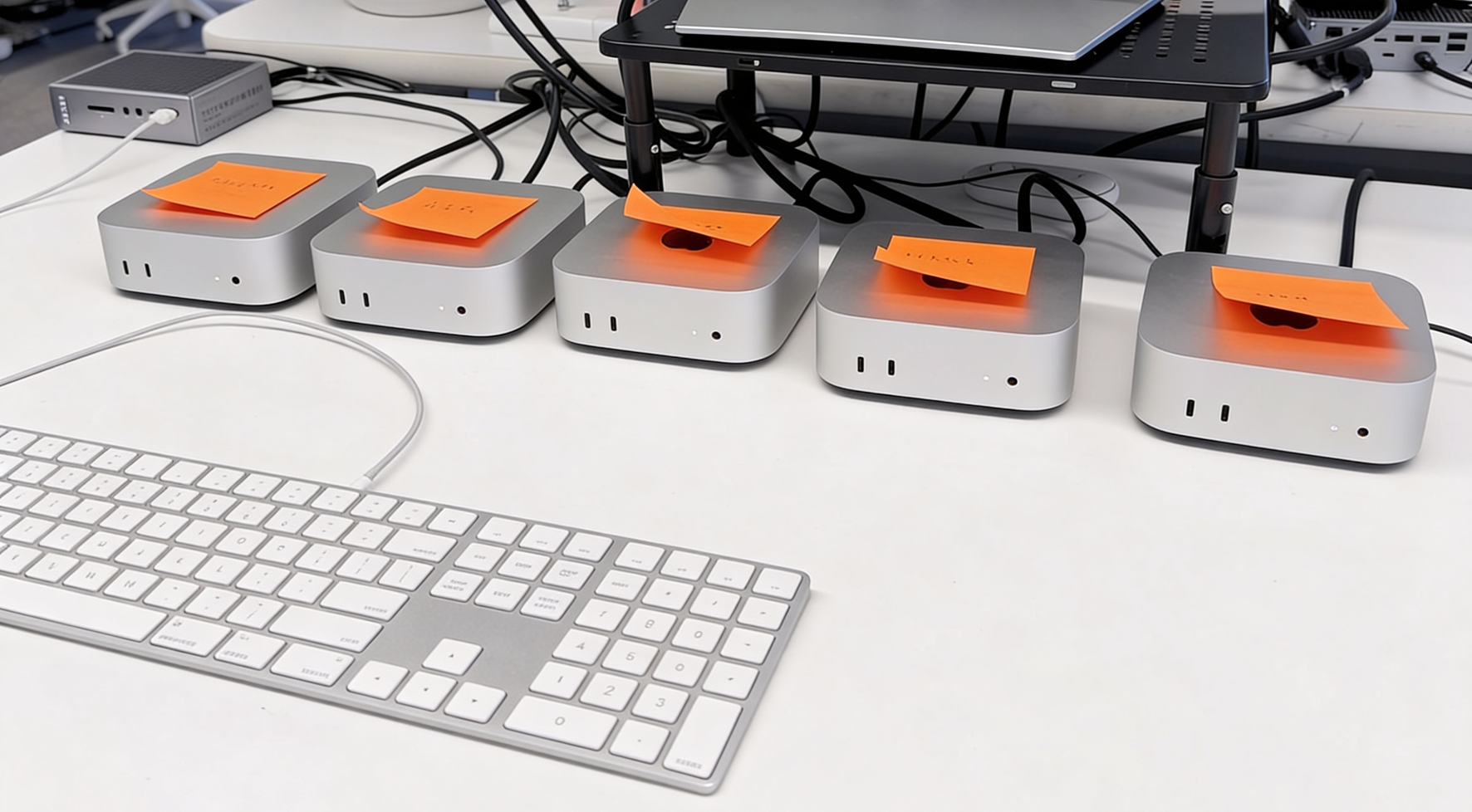
- Always-on economics: At 3–5W idle, five Mac Minis running 24/7 cost less in electricity per year than a single GPU rig idling. That photo circulating on X of five Mac Minis lined up on a desk? Someone built a silent, low-power local inference cluster for under $10,000. Good luck doing that with RTX 3090 towers.
- Real estate: The M4 Mac Mini is 5 × 5 × 2 inches. It fits behind a monitor. A full tower GPU rig does not.
- Thermal management: In a home office, waste heat is your problem. GPU rigs in summer are also space heaters.
None of this means NVIDIA is irrelevant. For serious training workloads, for multi-GPU inference at scale, for professional ML pipelines, CUDA + high VRAM is still the answer. But for the developer, AI product manager, or founder running a home office AI setup who wants to do smart local inference alongside cloud API calls — the Apple Silicon case is compelling and gets stronger every generation.
Where This Lands
The August delivery date is annoying. It confirms what the photo of five Mac Minis already told us: supply isn’t keeping up with demand. That’s a signal, not a coincidence.
If you’re building for a home office, the GPU rig is the high-decibel, high-power, high-footprint option that made more sense when Apple Silicon wasn’t this good. Today, a Mac Mini M4 Pro at $1,399 or a Mac Studio M4 Max at $1,999 gives you near-silent operation, serious unified memory for local LLM inference, best-in-class performance-per-watt, and a form factor that doesn’t require a dedicated equipment room — or a renegotiation of household noise policy.
Route your tokens intelligently. Run local models where they’re good enough. Route to cloud for the heavy work. And do it from a machine that doesn’t sound like it’s trying to take off.
Bharat Suneja is a former Microsoft Exchange product team member, ex-Microsoft MVP, and co-author of Exchange Server 2007: The Complete Reference. Exchangepedia.com has been his home on the web since 2004. He now writes about AI, infrastructure, and building with Claude and Claude Code.