
You’re troubleshooting an important issue and fire up Performance Monitor, only to be greeted by this bizarre visual— all your Perfmon counters show up as numbers! You restart Perfmon a few times, try to choose a different performance object – but it’s still numbers.
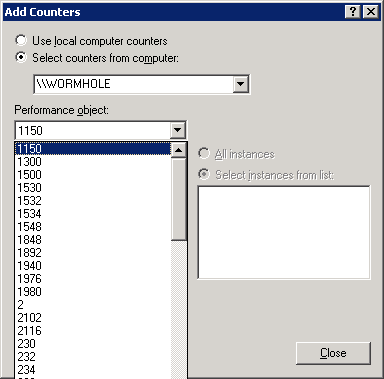
Figure 1: Performance Monitor counters and objects are displayed as numbers instead of object and counter names
Fix:
Lodctr.exe /r
It can take a little while (about 10 minutes in this case).
This was exactly my problem and exactly the simplest solution… thanks!
worthless…. what file name does one use??
Rock and Roll… That is exactly the problem. Does anyone know what this command actually does.
Worked fine for me!
Fantastic that solved it for me too. It also made the counters 'findable' by the RedGate performance and memory profilers.
yay … running away over the horizon clapping feet together
how do you use this command? i typed it in cmd, and proceeded but show no result??
Wigiblad YosemiteThanks this solved the problem with perfmon on server 2003. The command completed in less than a minute and my counters were usable again in perfmon.
To address some questions in the comments above.
1. You do not need a filename, run the command just as its posted (lodctr.exe /r)
2. You won’t see any output in the command prompt, when its complete you’ll return to the prompt but your counters should now show up using their names.
@Sam: Thanks for addressing the questions!
Nice!
We better keep this post in google top 10.
I had this or a similar problem long ago but didnt document it.
Thank You!
win server 2003 + exchange server 2003
counter objects changed to numbers after a server hang and hard reset.
//Jimi
This fixed the problem for me as well thank you so much!!!!
go to start then run and type:
Lodctr.exe /r
then press ok. so happy it worked.
using this Lodctr.exe /r command my problem also has fixed previously it was showing me numbers but it shows up as a name .
Thanks a lot .
Thank You :)