
In Exchange Server 2003, mail for a recipient can be forwarded to an alternate recipient by modifying the recipient’s Delivery Options in ADUC | recipient -> properties | Exchange General tab.
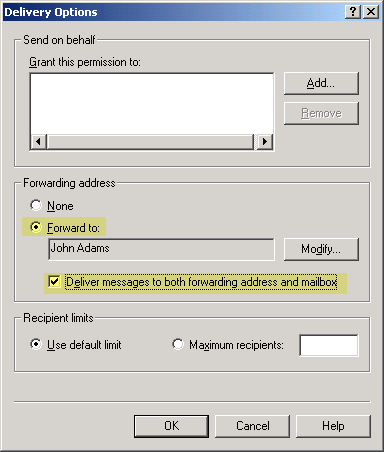
Figure 1: Use Delivery Options to auto forward email to an alternate recipient in Exchange 2003
If you need to forward mail to an external email address, you can’t simply type the address in the Forward to: field on the Delivery Options page. A (mail-enabled) Contact needs to be created in AD first, and Delivery Options modified to point to the Contact.
Forwarding mail to an external address in Exchange 2010 and Exchange 2007
In Exchange 2010/2007, these tasks remain the same. However, instead of using ADUC to accomplish them, you use the EMC or the Shell (aka “EMS“). The new term for a Contact is MailContact.
 Create a MailContact
Create a MailContact using the EMC:
- Expand Recipeint Configuration | Mail Contact
- In the Action pane, click New Mail Contact
- To create a new Contact object, leave the default (New Contact) selected | click Next
- Type First name, Last name
- Click Edit to add the external email address
- Click New to complete creation of new MailContact
Alternatively, use the Shell to create a new MailContact:
New-MailContact -Name “Foo User” -ExternalEmailAddress “[email protected]
Next, we set the recipient’s Delivery Options to deliver to the alternate recipient.
 Forward mail for a recipient to the MailContact
Now that we have a MailContact created for the external recipient’s email address, we can forward mail for the Exchange recipient to the MailContact. To configure mail forwarding using the EMC:
- Expand Recipeint Configuration | Mailbox | select mailbox | properties | Mail Flow Settings tab | Delivery Options
- Under Forwarding address, select Forward to
- Click Browse to select the MailContact
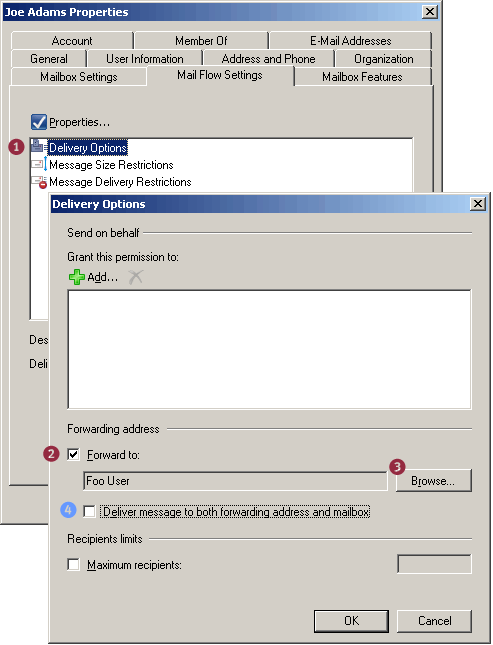
Figure 2: Modifying Delivery Options to forward email to an alternate recipient - Optional: If a copy of the message needs to be delivered to both the external recipient and the original recipient’s mailbox, select the Deliver message to both forwarding address and mailbox
To configure mail forwarding using the Shell:
Set-Mailbox “Joe Adams” -ForwardingAddress “[email protected]”
To deliver a copy to the mailbox (in addition to the external email address – equivalent of step 4 above):
Set-Mailbox “Joe Adams” -ForwardingAddress “[email protected]” -DeliverToMailboxAndForward $true
Listing users with forwarding enabled
This command lists mailboxes with auto forwarding enabled:
Get-Mailbox | where {$_.ForwardingAddress -ne $null} | ft name,forwardingaddress
Automatic forwarding and Remote Domains
Remote Domains define a bunch of settings, such as message formats, character sets, and OOFs for messages sent to specified domains outside your Exchange organization. The default Remote Domain setting for the address space * (the asterisk character) applies to all external domains except the ones for which you’ve created a Remote Domain for.
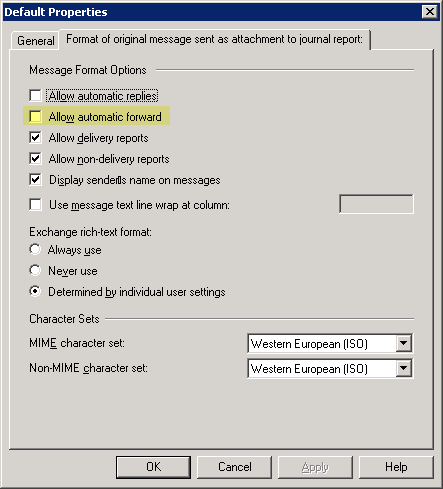
Figure 3: The Allow automatic forward setting for remote domains only impacts client-side automatic forwarding using mechanisms like Inbox Rules, and is disabled by default.
The Allow automatic forward setting for remote domains applies only to client-side forwarding using mechanisms like Inbox Rules. For instance, if a user creates a rule in Microsoft Outlook to automatically forward mail to an external email address, the default setting (for address space *) doesn’t allow it. To enable automatic client-side forwarding of mail to external addresses, select the Allow automatic forward checkbox in a remote domain’s properties | Format of original message sent as attachment to journal report tab (Yes, in Exchange 2007 the tab is mislabeled. It is the “Message Formats” tab… :).
Server-side email forwarding configured by an administrator, as shown in this post, is not impacted by this setting.
Hi all! I know this is an old thread. BUt does anyone know how to forward a specific outside domain (may be different emails but same email domain) only to be forwarded to multiple staff?
Can you provide more details? Do you want all email from a specific external domain to a group of recipients in your organization? You can use Transport Rules to check sender address/domain and redirect the message to a Distribution Group.
I am running Exchange 2010 and would like to forward an old internal address to an external address. Can I set a forward up on the mail contact and delete the old mailbox? (I’d really like to delete the mailbox)
I had multiple redirects to add to my email system. Spotted that the powershell command:-
Set-Mailbox “Joe Adams” -ForwardingAddress “[email protected]”
…Took a little while to run. Believe exchange looked through its directory for an account with that address. Managed to speed up that process by copying the exact ForwardingAddress value format after creating a test account by using the get command:-
get-mailbox 8282 | Select Name, ForwardingAddress
and then
Set-Mailbox “Joe Adams” -ForwardingAddress “MyDomain/Users/Joe Adams”
Above command seemed to run a lot quicker in my scripts.
Thanks for finally writing about >Exchangepedia | How
to forward mail to ann external email address <Loved it!
Hi,
Can I filter the emails that are being forwarded to an external address? Example is not to forward emails from internal users or emails from specific domain “@gmail.com”. All other emails will be forwarded to the external address.
Très, très bon article, merci
How about the SPF issues this will cause?
How do we change the sender address to a valid address before forwarding?
did you ever find a solution to this?
RE: How do we change the sender address to a valid address before forwarding?