
In Exchange 2010/2007, you can use Email Address Policies to generate email addresses for your recipients (mailbox users, mail users, distribuiton groups, public folders, etc.). In Exchange 2003/2000, this was done by Recipient Policies. Policies are a great way to assign standardized email addresses across your organization – for example: <firstinitial><lastname>@<domain>.
Users frequently request additional email addresses to be added to their account. These are known as aliases or proxy addresses (the latter because email addresses are stored in the recipient’s proxyAddresses attribute in Active Directory).
Add additional email addresses using the EAC in Exchange 2013 and Exchange Online
- In the left navigation bar, click recipients > mailboxes
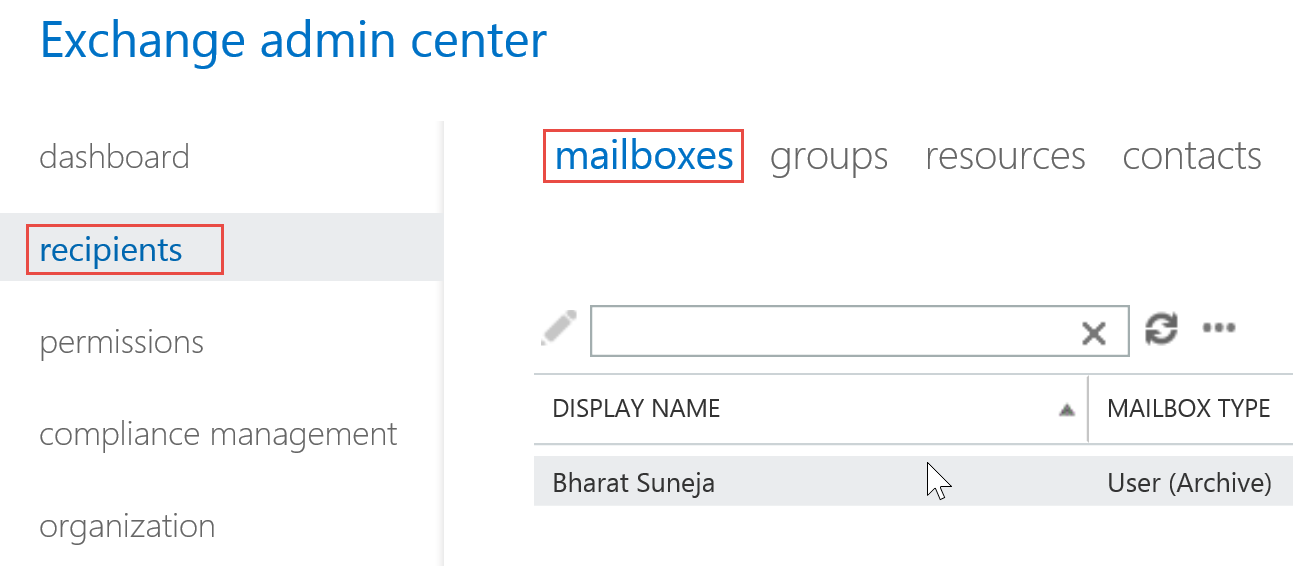
Figure 1: Select the mailbox in EAC > Recipients > Mailboxes
- Select a mailbox and then click
 (Edit button – or double-click the mailbox)
 - On the User Mailbox page, select email address and then click
 (the New button)
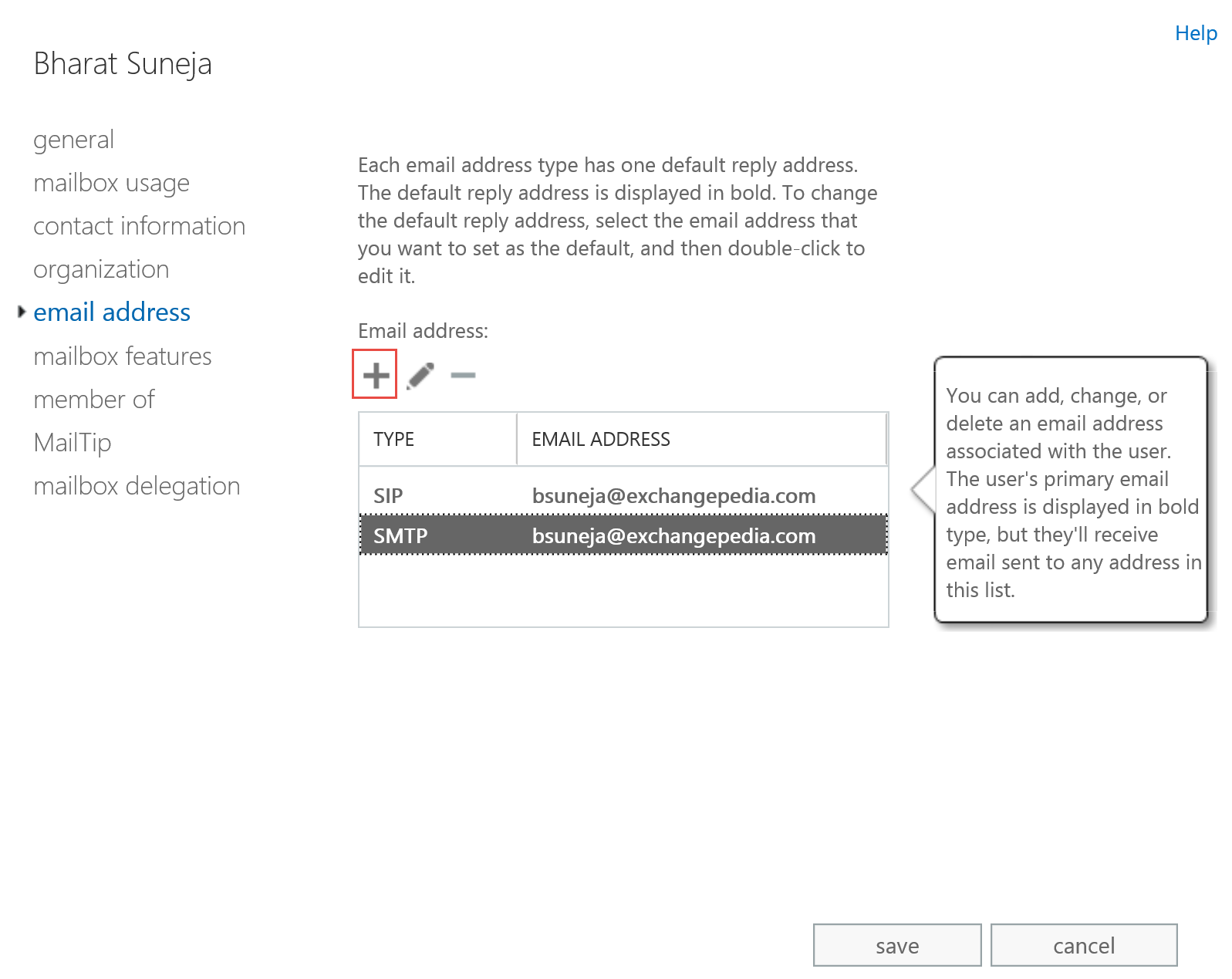
Figure 2: Add an email address on the email address page in Exchange Admin Center (EAC)
- To add a new SMTP address (default), type the address in the Email address field and click OK > Save.
SMTP is the default email address type. You can also add Exchange Unified Messaging (EUM) addresses or custom addresses to a mailbox.
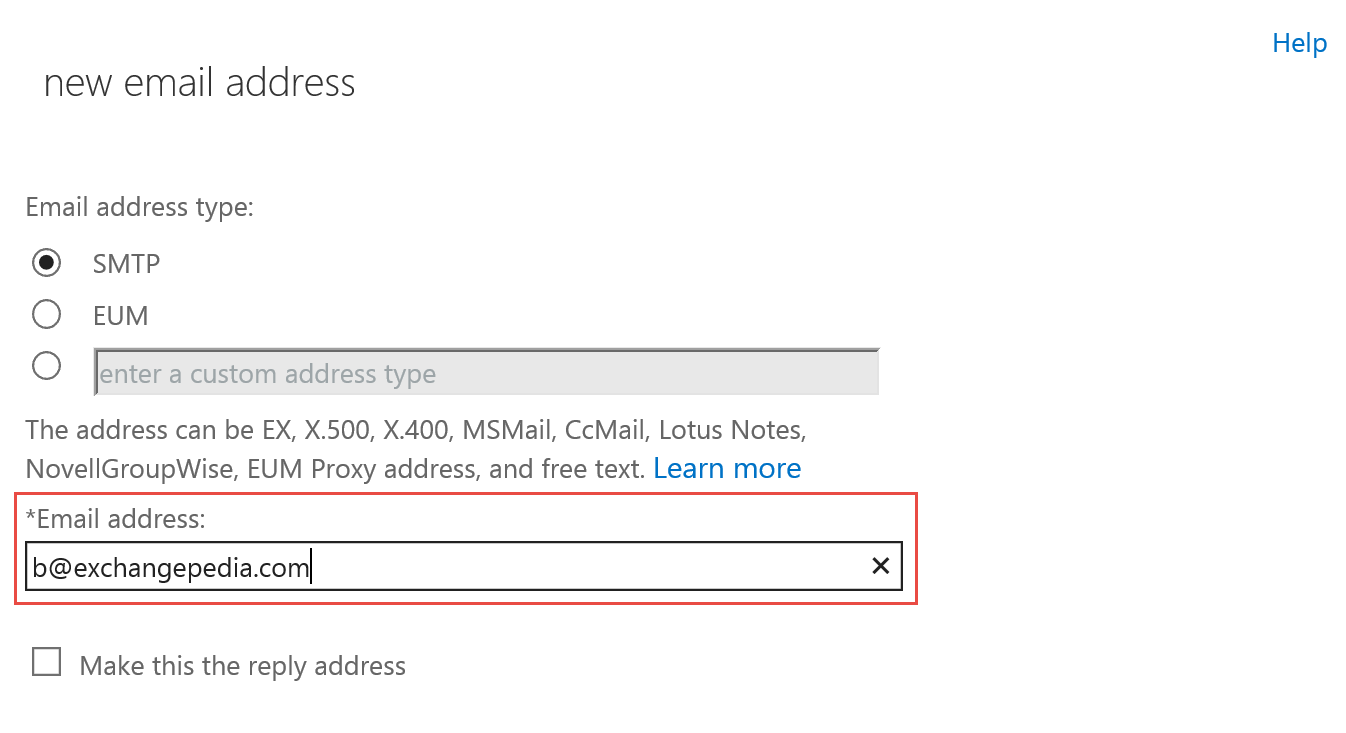
Figure 3: Type a new address in the Email address field
Add additional email addresses using the EMC in Exchange 2010 and Exchange 2007
You can easily add additional SMTP email addresses using the EMC:
- Expand the Recipients node
- Expand the corresponding node for the recipient type: Mailbox, Distribution Group or Mail Contact
- Select a mailbox, Distribution Group or Contact | Properties | E-mail Addresses tab
- Click Add
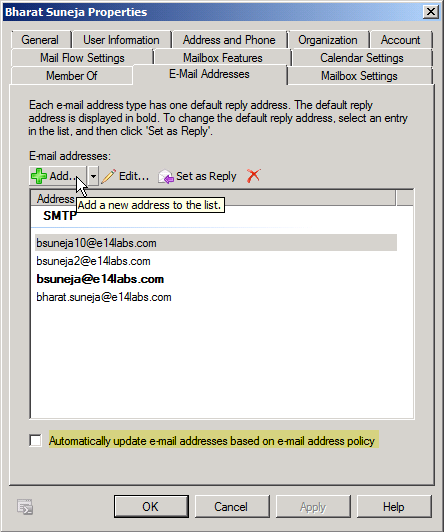
Figure 4: You can add an additional email address, known as an alias or a proxy address, from the E-mail Addresses tab in the Exchange Management Console (EMC)
Add additional email addresses using the Shell
When adding new email addresses to a recipient using Exchange shell, remember that EmailAddresses property (or the proxyAddresses attribute in Active Directory) is a multi-valued attribute. You can use the same syntax described in the previous post “HOW TO Update multi-valued attributes in PowerShell” to add one-off email addresses that are not created by an Email AddressPolicy.
$foo = get-mailbox bsuneja
$foo.EmailAddresses += “[email protected]”,”[email protected]”
$foo | set-mailbox
Adding an additional email address in Exchange 2010/2013
In Exchange 2010, which uses PowerShell v2, you can add an additional email address to a recipient by using a simpler one-line command:
Set-Mailbox bsuneja -EmailAddresses @{Add=’[email protected]’}
Similarly, to remove an e-mail address in Exchange 2010:
Set-Mailbox bsuneja -EmailAddresses @{Remove=’[email protected]’}
Once you’ve added additional email addresses for a recipient, the next common question is: Can the user send and receive email using this new email address? Find out more in HOW TO: Send as alternate email address.
Hi Bharat,
I wanted this to work with recipients.csv as mentioned in your excellent post “Bulk creation of mailboxes using Exchange Management Shell” (http://www.exchangepedia.com/blog/2006/11/exchange-server-2007-bulk-creation-of.html)
So with this code I can use the same csv file:
Import-CSV CreateRecipients.csv | foreach {
$Temp = Get-Mailbox -identity $_.UPN
$Temp.EmailAddresses.Add($_.Emailadres1)
$Temp.EmailAddresses.Add($_.Emailadres2)
$Temp.EmailAddresses.Add($_.Emailadres3)
Set-Mailbox -Instance $Temp}
How can you add custom address types such as X500 from powershell?
By appending the address type, e.g.:
$foo = get-mailbox jdoe
$foo.emailaddresses += “X400:C=USA;….. “
$foo | set-mailbox
When the second email address is created and then I try to send to that address it gets bounced back saying the recipient does not exist.
How can I create another email address for an existing user or users who already have email addresses?
Thanks
[…] You can use Exchange Server’s Email Address Policies (Exchange Server 2010/2007) or Recipient Pollicies (Exchange 2003), or the E-mail Addresses tab in EMC (Exchange 2010/2007) or Active Directory Users & Computers (Exchange 2003), to add additional email addresses for recipients (e.g. mailbox-enabled or mail-enabled users, Distribution Groups, mail-enabled Public Folders and Contacts). To find out how to add an additional email address for a recipient, see HOW TO: Add additional email addresses to a recipient. […]
I tried to do this via automation, but have not a clue, how i can pass the @{Add=”} Block as Parameter to the Set-Mailbox command. Do you have any advice for this?
How can i get this address to sort by alphabetical order.
Need help with getting the list to sort by alphabetical order.
How do I set emailaddress parameter from c#.
I have a c# line like that
psh.AddParameter(“EmailAddresses”, “[email protected]”);
It works replacing one of my proxy addresses.
I would like to know how do I set ADD or REMOVE from c# to EmailAddress parameter.
What is the direct e-mail address I can find to discuss with the
writer of this article?
Hi,
We are using Exchange Server 2007. We have 2 Accepted Domains wherein domain1.com is the default domain and we have recently added another domain2.com. We want to add domain2.com to all the user but at the same time don’t want to make it the default Set as Reply email address. How can I do that using Powershell ?
To create a new Accepted Domain:
New-AcceptedDomain -Name “Contoso” -DomainName contoso.com -DomainType Authoritative
To update the email address policy with new domain (will add proxy addresses, domain1 will continue to be primary):
Set-EmailAddressPolicy [your current policy name] -EnabledEmailAddressTemplates “SMTP:%[email protected]”,”smtp:%[email protected]”
Test in a non-production environment first.
Hello how are you doing? You know how I can do to add a secondary address in exchange 2007 from the shell
I am using 2007 exchange which would be the way to add an SMTP address to a user from the shell
How can I get it to show in their Outlook when they open a new email and select which email they want to choose?
@Freddy, if you mean how do you send an email using anything other than the primary email address, please see the end of the article.