
You can change the fully-qualified domain name (fqdn) used by a SMTP virtual server from its properties | Delivery tab | Advanced | Fully-qualified domain name. In the following example, we change the fqdn of a SMTP virtual server from its default – letter.exchangelabs.net, to postcard.exchangelabs.net.
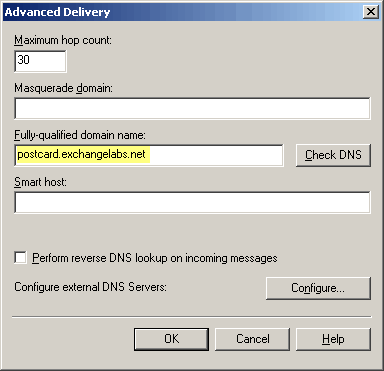
Figure 1: Changing the fully-qualified domain name in SMTP Virtual Server properties
What this does:
- Changes the fqdn displayed in the SMTP banner.
- Changes the fqdn provided in HELO/EHLO command when sending outbound mail (see relevant part of a packet capture)
- The fqdn provided in HELO/EHLO commands shows up in the Received headers in the message.

Delivered-To: [email protected]
Received: by 10.142.188.12 with SMTP id l12cs257007wff;
Tue, 18 Dec 2007 07:24:25 -0800 (PST)
Received: by 10.114.15.1 with SMTP id 1mr2552630wao.27.1197991464897;
Tue, 18 Dec 2007 07:24:24 -0800 (PST)
Return-Path: <[email protected]>
Received: from postcard.exchangelabs.net (64-169-85-157.ded.pacbell.net [64.169.85.157])
by mx.google.com with ESMTP id m40si5110107wag.2007.12.18.07.24.20;
Tue, 18 Dec 2007 07:24:24 -0800 (PST)
Subject: test fqdn
Date: Tue, 18 Dec 2007 07:22:22 -0800
Message-ID: <086C0984D0478545845025F046CD4E3F037678@LETTER.exchangelabs.net>
From: “Joe Adams” <[email protected]>
To: “foo” <[email protected]>
What it doesn’t do:
- Doesn’t change the fqdn used in the Message-ID, as seen in the above headers.
Why can’t the SMTP VS change the Message-ID as well?
Because RFC 2822 says so – a Message-ID is a globally unique identifier of a message. Once created, the Message-ID for a particular instance of a message should not be changed. It allows one to track messages, and correlate multiple messages to the same thread (using additional header fields like references and in-reply-to).
It’s not very often that the SMTP VS encounters messages without Message-IDs. SMTP clients generally generate the Message-ID. When using Outlook (MAPI) or OWA, the Exchange Store generates it. When the SMTP VS sees a message without a Message-ID, it does create one. Try this by telnetting (I’m working on getting this word officially recognized as a verb… :) to the SMTP port of the server, and sending a message. The SMTP VS accepts the messages, and provides you with a Message-ID that uses the changed fqdn.
Changing the fqdn doesn’t really “hide” the original fqdn of your server, and the server’s IP address is still visible in message headers. As such, it is merely a cosmetic change that doesn’t accomplish much in most scenarios. (I frequently refer to and quote Scott Landry’s excellent post on the team blog: SMTP Virtual Server Myths Exposed. It’s a must-read – Scott addresses the fqdn issue in Myth 3b: Modifying The FQDN of the SMTP Virtual Server).
Does changing the fqdn on the SMTP virtual server ever make sense?
Yes, in some scenarios:
- SMTP VS that serves as a Bridgehead for outbound internet mail, if the server’s original fqdn uses an invalid or unregistered domain or the hostname has an underscore (_) character (Refer to KBA 841091: Characters that are not supported for object names in Exchange). However, rather than using the default SMTP virtual server for outbound/inbound internet mail, it is recommended to create an additional SMTP Virtual Server for this.
- If the Exchange server has more than 1 SMTP virtual server
SMTP Virtual Server FQDNs and Service Principal Name
If you do decide to change the fqdn on the default SMTP virtual server, ExBPA will warn you about a missing Service Principal Name (SPN) in AD.

Figure 2: ExBPA error: Missing Service Principal Name. More information
Also take a look at the Kerberos authentication issue that may cause messages to be NDRed with a 550 5.7.1 Unable to relay for [email protected], mentioned in KB 914137: Exchange Protocol Security authentication fails after you install Windows Server 2003 Service Pack 1 on a server that has multiple SMTP virtual servers in Exchange Server 2003.
Masquerade domain
If the fqdn field does all of the above, what does the Masquerade domain do?
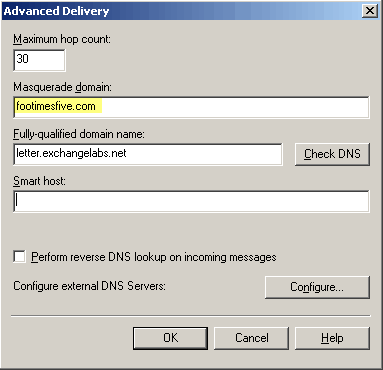
Figure 3: Changing the masquerade domain in SMTP Virtual Server properties
The online documentation provides a hint:
“Use this text box to type an alternate domain for other SMTP servers to use when sending non-delivery reports (NDRs). NDRs will be returned to the alternate domain specified, instead of the domain from which the email originated.”
If you change the masquerade domain, restart the SMTP VS and send a test message, chances are you won’t see any changes in message headers.
The Masquerade domain setting works when the SMTP VS is a bridgehead for a Connector, and the mailbox that is used to send a message does not reside on the same server.
If it is a Bridgehead for a Connector, the SMTP VS changes the Return-Path header so NDRs are returned to the masquerade domain, as seen in the following headers (irrelevant header fields removed):
Delivered-To: [email protected]
Return-Path: <[email protected]>
Received: from letter.exchangelabs.net (64-169-85-157.ded.pacbell.net [64.169.85.157])
by mx.google.com with ESMTP id b2si10345244rvf.2007.12.18.07.05.28;
Tue, 18 Dec 2007 07:05:29 -0800 (PST)
Received: from STAMP.exchangelabs.net ([172.31.0.169]) by letter.exchangelabs.net with Microsoft SMTPSVC(6.0.3790.2499);
Tue, 18 Dec 2007 07:03:33 -0800
Subject: Test masquerade fro
m Jonstamp
Date: Tue, 18 Dec 2007 07:03:33 -0800
Message-ID: <[email protected]>
From: “Joe Onstamp” <[email protected]>
To: “foo” <[email protected]>
Return-Path: [email protected]
Excellent post Bharat. This clears up the confusion – very well illustrated.
Thanks for a wonderful blog!
Thanx for your work, helpful blog
Sorry but I am a novice and still confused about the masquerading. My question is what domain do I put in for masquerade domain? A fake one? Do I make one up?
Generally speaking, you don’t need to have a masquerade domain. If you need NDRs (for messages sent by your users that cannot be delivered by remote/external domains) to be sent to a different domain than the one used in your email addresses, that’s when you would need to add that domain to the masquerade domain field.
In other words, you would need this if you send a message FROM [email protected], but want NDRs to be delivered to [email protected]. You would add domain2.com as the masquerade domain.
That’s for Exchange 2003. Doeas anyone knows how you do this in Exchange 2007?
You can change the fqdn on Send Connectors using the console, or from the shell using the following command:
Set-SendConnector “ConnectorName” -fqdn “something.yourdomain.com”
If you have an Edge Transport server in the topology, this change should be made on the Edge. If the change is made on a Hub Transport server (i.e., a HT is the source server for the Connector), this change doesn’t do anything— the actual server fqdn is used.
To change it on a Receive Connector, use Set-ReceiveConnector.
Correction to the above comment:
If you change the fqdn on a Send Connector on a Hub Transport server which **also has the Mailbox server role installed**, the change will not have effect and the actual server fqdn will be used.
Dear Bharat,
Could you please let us know how we can hide header information.
Well Bhart, your blog has clear explanation, I understood very well masquerade domain. Thanks
Shambhu
Thanks for the great explaination. Why can't Microsoft's documentation have such great examples?
Excellent job, found the information useful and easy to understand.
[…] and “sharepoint.dev.com”. For more info on these two items check this post at Exchangepedia. The most important part for us is the “Smart host”, which needs to be our SMTP […]