
You disable a particular anti-spam agent — let’s say the Content Filtering Agent, using the Exchange Management Console (EMC).
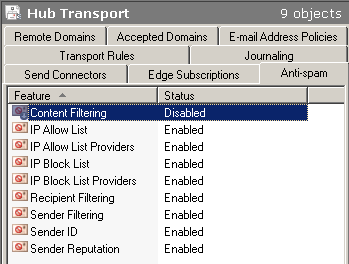
Figure 1: Disabling a transport “agent” in the Exchange Management Console
Next, you use the Get-TransportAgent command to get the status of transport agents — and surprisingly the Content Filter Agent shows up as Enabled!
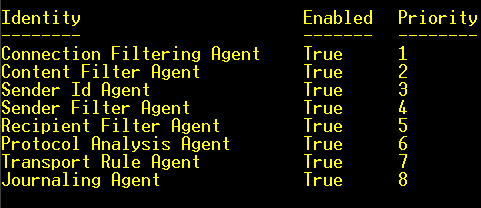
Figure 2: The agent shows as enabled in Shell
Why doesn’t Get-TransportAgent agree with the EMC about the status of an agent?
Fellow MCT and Exchange geek David Elfassy blogged about it recently.
The Anti-Spam tab is located under the Organization Configuration | Hub Transport node in the EMC. Disabling a transport agent from the EMC prevents the agent on all transport servers in the Organization from taking any action. It’s an Organization-wide or global setting.
The Get-TransportAgent cmdlet is transport server-specific. It shows the status of agents on a particular transport server. With the Org-wide configuration set to disabled, an agent enabled on a particular transport server behaves like a soldier instructed to fire but not kill. (May not be the best analogy – it doesn’t exactly scare spam, and it doesn’t do much else).
Update: The column is correctly labeled as Feature in the EMC. You’re actually disabling a feature for the entire Exchange Organization.
To draw a parallel to Exchange Server 2003, you can enable settings on a particular filter – e.g. Recipient Filtering, in Global Settings. However, you still have the flexibility to enable/disable it on a per-SMTP virtual server basis. This is somewhat similar.
To get the global/Org-wide status of a particular filter, you need to use the corresponding cmdlet for that filter. This list shows the cmdlet you can use for each filter.
- – Content Filter Agent: Get-ContentFilterConfig
- – Recipient Filter Agent: Get-RecipientFilterConfig
- – Sender Filter Agent: Get-SenderFilterConfig
- – SenderID Agent: Get-SenderIDConfig
- – Protocol Analysis Agent: Get-SenderReputationConfig
If you’ve carefully looked at the above list, you’re probably wondering why there’s no mention of the Connection Filtering Agent in it. The Connection Filtering Agent handles multiple tasks which are listed individually in the console. To check the global setting for configuration of each, use the corresponding config command:
- – IP Block List: Get-IPBlockListConfig
- – IP Block List Providers: Get-IPBlockListProvidersConfig
- – IP Allow List: Get-IPAllowListConfig
- – IP Allow List Providers: Get-IPAllowListProvidersConfig
Disable a transport agent feature for the entire Organization
To “disable” an agent in Organization Configuration (equivalent of what you do in the console) using the shell, use the corresponding Set command, e.g.:
Set-ContentFilterConfig -Enabled $false
Disabe a transport agent on a transport server
Next, let’s take a look at how you can disable an agent on a transport server. Generally, if the Get-Blah command returns a property like Enabled: True, you can use Set-Blah -Enabled $false to disable it (You probably know where we’re going with this by now… :). Not so for Get-TransportAgent cmdlet. Its “Set” counter-part – Set-TransportAgent allows you to modify only one property -Priority. You can change the order in which these agents fire by changing their Priority.
Use the Disable-TransportAgent command to disable an agent on a transport server:
Disable-TransportAgent “Connection Filtering Agent”
No points for guessing the command used to enable a transport agent – Enable-TransportAgent.