
Frequently users report recipients missing from the GAL. So begins the mystery of missing recipients.
These are existing users, not new ones. New users don’t show up in the GAL for clients using Outlook 2003 Cached Mode clients, because Outlook uses an Offline Address List (aka “Offline Address Book” or OAB), which is generated once every 24 hours by default [read previous post “New user does not show up in GAL“]
In this case there are existing users who did show up in the GAL earlier but have disappeared now.
Scenario:
– Recipients are not hidden from Exchange Address Lists
– Recipients do show up in the “All Users” Address List
– Recipients do show up when Outlook’s not in Cached Mode
– Recipients resolve in Outlook Web Access
Some recipients may not be included in the Offline Address Book when it is generated, for a number of reasons.
With Diagnostics Logging for OALGenerator bumped up (in server properties | Diagnostics Logging tab | MSExchangeSA -> screenshot), the OAB was regenerated manually. Sure enough, errors were logged for the missing users.
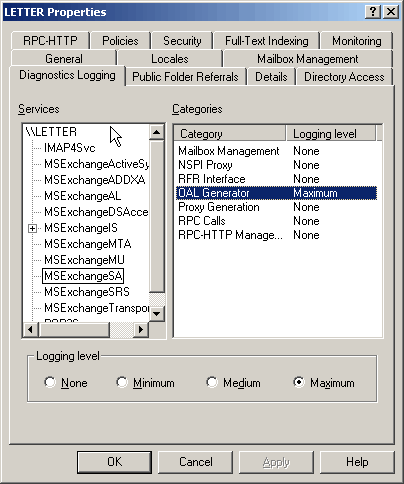
Details:
Event Type: Error
Event Source: MSExchangeSA
Event Category: OAL Generator
Event ID: 9325
Date: 1/30/2007
Time: 3:04:17 PM
User: N/A
Computer: LETTER
Description:
OALGen will skip user entry ‘Joe Adams‘ in address list ‘\Global Address List’ because the SMTP address ” is invalid.
– Default Offline Address List
On closer inspection:
– The reason these recipients show up in the “All Users” Address List is because that Address List is not part of the OAB – only the Default GAL is, as shown in the screenshot below. Therefore, if you disconnect the client from the network, you can’t see the “All Users” Address List.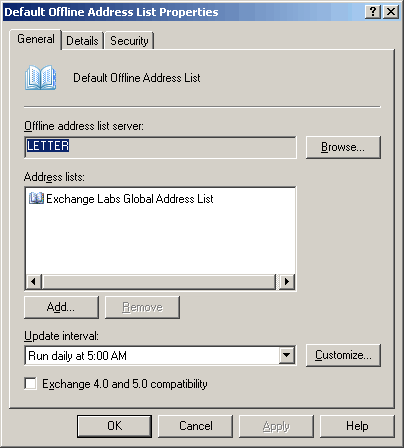
– The default SMTP email address of the user – as displayed on the Email Addresses tab with uppercase SMTP: was [email protected].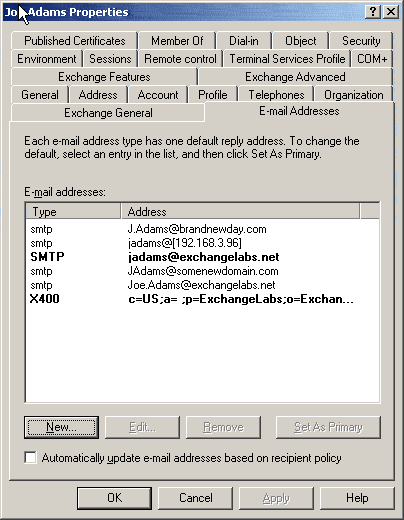
However, on the recipient’s properties | General tab, it showed up as [email protected].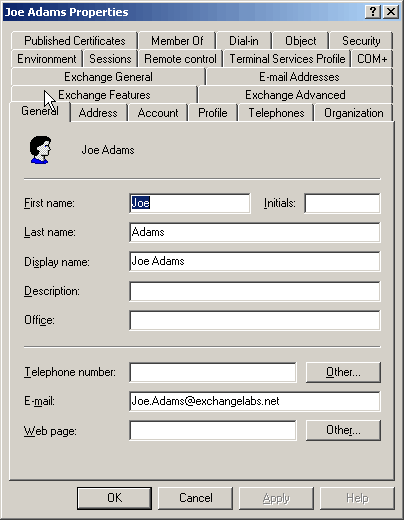
– The address on the General tab was corrected to match the default email address – [email protected]
– The OAB was regenerated, and complete OAB downloaded in the Outlook client.
Voilà, the missing users showed up!
And thus was solved the mystery of the missing recipients.
Great post, thanks to this information I was able to figure out why recipients were dropping off my global address list.
Though, I’m interested in understanding why the mismatch b/w email addresses occurred. Intuitively, when you change the primary email address in the EMC, it should also update the AD object via ADUC. Right?
Yes, Active Directory Users & Computers does that check. This scenario would happen when tools other than ADUC are used – including LDAP import of attributes, which don’t perform such validation.
Bharat
Thanks alot for this post! I was also able to find out, why certain users dropped off the GAL…
But I have to mention, that I don’t use any other tools to maintain users and mailboxes than EMC and MMC, and still I had these problems with the synchronisation…
Great Post. I wish I would have seen this post when I had this problem earlier in the year.
I just had this same problem, but read a different solution that worked.
Another symptom was this: The Email Addresses tab was missing.
In my case, the whole problem was that somehow, the Alias field on the Exchange General tab was set to Blank.
I typed the users logon name in the Alias field, clicked Apply, waited a minute and everything was back to normal.
Awesome! man that was killing me for the last few months!
THANK YOU!!! Another crummy EMC feature.
I have the same problem with EX2K7.
A user’s name and default SMTP address was changed from the EMC. This automatically updates AD. I apply the changes in EMC, Update the OAB and from Outlook2007 Download the OAB. But still the users name does not change in the GAL. It appears in the All users correctly, as well as when Cached mode is turned off…. I have checked the default SMTP as well as the email address in AD. Everything looks right ???
Ivan…I am having the exact same issue and I have done everything you said too….have upgraded to SP1 yet? Jw if its fixed in there…
Are you downloading the full address book?
Same problem here. The users not showing up DID not have right mail addresses, but that is corrected as stated here.
The GAL is updated and downloaded, I also see the right mail-addresses now on those users not shwoing up on the GAL when I look in All users. They are still not in the GAL though :/
i have ex07+sp1 and just had this error… just applied the rollup, we’ll see how that works.
same problem here.
noticed the file under C:\Program Files\Microsoft\Exchange Server\ClientAccess\OAB
has an old copy, but file under C:\Program Files\Microsoft\Exchange Server\ExchangeOAB has the current copy
i tried to copy of the files, and it worked! but then other things are broken, and was forced to change it back…do not try this….
any other ideas???
Been wrestling with this issue for months. VERY frustrating. Thanks for the help!
I have been having this same issue “users in cached exchanged mode cannot view new users in GAL (OAB) but can if they’re not in cached mode or from OWA”. I FIGURED MY PROBLEM OUT! Not sure if it will fix anyone elses problem, but here it was:
I found that the Microsoft Exchange File Distribution service was not started. It was set to Automatic, but was Stoped. I started it and viola! users populated in GAL.
it has helped me, thanks man
Dominique, thank you very much. That fixed my issue.
I Found out that when you make a copy of a user that has already an emailbox then the copied users still keeps popping up in the OAL Generator page saying “because the SMTP address ” is invalid.”
but that copied user didnt get any mailbox/account. I was unable to figure out why this was happening.
Regards T@ll0ne
Dominique, I had the same issue, I restarted the service (mine was started) and it fixed the issue. Thank you for that.
Hi I have that Issue I see the contact under All contacts, but not in GAL , the contact could be found through OWA with CTRL+K, but not in Outlook2007. I have SBS Exchange 2003 and Outlook 2007.
I've had to take a hybrid approach to fix this issue on Exchange 2007 SP1 with Outlook 2007 clients in cached mode:
Firstly, I noticed that the users I was having problems with had a strange e-mail address in "Active Directory Users and Computers" (ADUC) –> {User} –> General (tab) –> E-mail (field). This e-mail address did not match the address in "Exchange Management Console" (EMC) –> Recipient Configuration –> Mailbox –> {User} –> E-Mail Addresses (tab) –> Address (field).
In my case, the user's name was "Kathy St. Pierre". The e-mail address in EMC was correct with "[email protected]" while the e-mail address in ADUC for some reason was "KSt. [email protected]" which is not even a legal address!
Once I fixed the e-mail address in ADUC to match the default SMTP address in EMC, I went to look at the dates of the files in "C:\Program Files\Microsoft\Exchange Server\ClientAccess\OAB". As a previous poster noted, these all had old dates. However, the file dates in "C:\Program Files\Microsoft\Exchange Server\ExchangeOAB" had current dates.
As suggested by "dominique" I looked at the "Microsoft Exchange File Distribution" service. In my case it was set to Automatic and was running. For good measure I restarted the services and boom! all the files in "C:\Program Files\Microsoft\Exchange Server\ClientAccess\OAB" suddenly updated.
My Outlook clients still were missing certain contacts in the Global Address List (GAL), so I forced them to update their address books by "Microsoft Outlook" –> Tools –> Send/Recieve –> Download Address Book… –> (uncheck) Download changes since last Send/Recieve, (check) Full Details, click OK. I'm assuming that if I had been patient this information would have eventually made it to the client, but it's nice to know you can force a full GAL download to a cached client.
Hope this helps.
–Forrest C. Shields II
Thanks, this was a great help, I’ve been wrestling with this problem for a while. Cheers.
I have ran every fix I’ve seen on the internet and have been unable to remedy the issue. This is so frustrating.
Thank you very much – I spent all day running OAL generation with -vb getting nowhere – this resolved the issue straight away!
We’ve been fighting this Exch 2007/cached-mode/GAL issue for weeks. I’ve tried all of the tricks posted on several sites. None work.
I have a user whom used to be a Global Contact but now has a mailbox on our Exch 2007 server. Yet anyone in cached mode still only sees her as a Contact.
I’ve restarted services, downloaded the OAB, nothing except unchecking cached mode will display her correct Exch 2007 email info. This is becoming a big issue because there’s a possibility all of my users may be required to go to cached-mode. We need to get cached-mode and the GAL in sync ASAP. Help?!?
I also noticed – I don’t find on my Exch 2007 CAS/HUB server:
C:\Program Files\Microsoft\Exchange Server\ExchangeOAB
I do have C:\Program Files\Microsoft\Exchange Server\ClientAccess\OAB
with a encrypted looking folder. The modify date of the folder is current but the contents are all very old.
Dominique, thanks dude, I had the exact same problem and couldn’t figure out how to fix it!
How about you get this problem on EX07 when the users don't have email address? I have users with not emails, just login accounts – Not sure why it keeps show that error on EventV. Double, triple checked AD for any user misconfiguration and everything there is fine. Anyone?
Thanks.
Hi MannyG – Have exactly the same problem, some users do not have e-mail addresses, and should not be in the OAL, but still errors ocoure stating that they have invalid e-mail addresses… – Did you find a solution?
Thanks Finn
I have a similar problem. After upgrading from 2003 to 2007 our GAL was not updating with any new users. After closer inspection i noticied that the GAL that was defaulting in our clients was a custom address list created in 2003. The "Default Global Address book" was listed below that and contained all the new users. My question is how do you remove the old GAL and automatically have the defualt GAL display for everyone at the top.
@ fshields
When I tried your solution I ran into the error addressed by KB905813. After going through that KB everything worked great. Thanks!
Mine stopped working after installing Update Rollup 9. Anyone else have this problem?
Hi MannyG
Look at the user attribute showInAddressBook in ADUC : it should be 'not defined' (if not delete everything and save, it worked for me)
My issue was that C:\Program Files\Microsoft\Exchange Server\ClientAccess\OAB was completely empty. After checking on the properties of my databases I found that they were configued to use a Default GAL that doesn't exist any more (from my old 2003 Server that has been decommissioned). Once I changed them to my new GAL all is well.
Also, I found that when I looked at the properties of my OAB it was not configured to be distributed to all of my servers. Once I updated that it finally appeared.
Thanks Dominique!!
I also found that the Microsoft Exchange File Distribution service was not started. It was set to disabled.
started it
send/rec (update address book)
solved!
thanks!
Windows 7 Ultimate with Deskcapes rules!
Is there any way to change the default 24-hour automatic download for the OAB? I need this to be more frequent.
RESTARTING the Microsoft Exchange File Distribution service followed by the usual forcing of the OAB to update WORKED LIKE A CHARM!
I wonder why restarting the server and updating the OAB manually didnt do the same thing? Does exchange need to be mounted BEFORE the MEFD service starts or something?
Hi All, Ive tried everthing listed above and still unable to show new users unless ‘Cached Exchange’ mode is unticked.
Any more ideas?
Great blog post.
Thanks a lot for taking the time and spelling it out so nicely.
Great Blog! I am in the boat of the “All Users List” Not Updating for all the Cached Exchange Users (OAB), yet the GAL is Correct? Unfortunately the “All Users List” is the Default? I need to FORCE an update of the OAB for the “All Users List!”
I will look to run the Microsoft Exchange File Distribution service on both of our CAS Servers, we are in a CCR Cluster, so have these files and Folders Spreadout through the Organisation..>!? If I turn off Cached Exchange Mode the GAL becomes the Default Address List BUT the “All Users List” is Correct! Also the OAB Distribution is coming from the “Clustername” which has moved between the 2 CCR Servers, I think this adds to the confusion on “who” is boss and who owns the list!? I will keep you posted on how I fix this “Pain in the A***!”
Cheers, Tony
I’m with Jay on this –
Quote – “38 Jay September 9, 2010 at 4:56 am
Hi All, Ive tried everthing listed above and still unable to show new users unless ‘Cached Exchange’ mode is unticked.
Any more ideas?”
(Windows Server Standard2008, Exchange Server 2007 SP3, Outlook 2007)
Additional my sitution is similar to others. User shows up under All Address List – All Users; user shows up under GAL with Exchange Cached Mode NOT enabled(this is not an exceptable option though); then the primary issue, user does not show up in GAL with Exchange Cached Mode enabled.
I CAN see the user in the GAL in OWA.
I have also tried other option I have found on the net (though I forget which so I lack the details at this time). PLEASE! Anyone else with suggestions add to this post. You don’t have to register to post.
Thanks!
Did you ever find a solution to your problem, Kris?
Restarted File Service on my CAS server and then force download of OAB from Outlook and the user showed up.
Thank you very much for this post!!! :D One of the Exchange problems that can take you to madness….
I tired the above solution but didnt work. i have one user who’s last name got changed so there are 2 email address on EMC email address tab. AD email address is same as EMC address which is bold. its showing up in OWA but not in GAL.
I have tried downloading OAB but nothing.
Restarting the MS Exchange FDS worked great!!
I can live with a restart of the service ever time I add or change a user.
Thanks!!!
Hi All,
had the same problem but for me this helps:
stop the Background intalligence Transfer service
go to regestry
HKEY_LOCAL_MACHINE\SOFTWARE\Microsoft\Windows\Curr entVersion\BITS
Make Uselmcompat value as Zero
if it is not there please create new DWORD and rename as Uselmcompat and value as zero
restart the Background intalligence Transfer service
Are you suggesting these changes be made to the client workstation or the server?
Really Helpful. Thanks for the post.
Regards
Pramod