
Scenario: You’ve created a new user (or any Exchange recipient that should show up in Exchange Address Books/GAL), but the recipient does not show up in the GAL in Outlook.
 Are you using Outlook 2003/2007 in Cached Mode?
 If yes, login using Outlook Web Access and try to send the user an email. Does the name resolve?
 If yes, it’s most likely related to the Offline Address Book (OAB) not being updated.
In Cached Mode, Outlook 2003/2007 clients use the Offline Address Book to lookup recipients. By default, Exchange generates the Offline Address Book once a day at 4:00 AM. New recipients do not show up in the OAB till Exchange updates it.
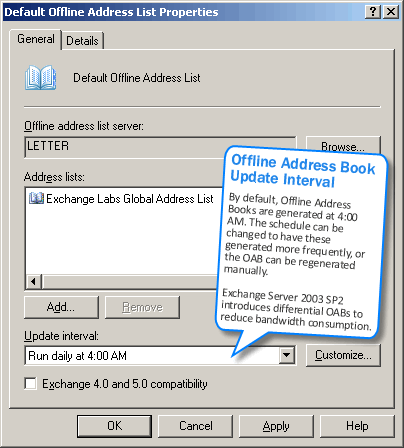
Figure 1: By default, Exchange updates OABs once a day at 4:00 AM
Rebuild the OAB
To make new users show up in the GAL immediately, you can force a rebuild of the OAB. Once the OAB is rebuilt (may take longer in larger organizations), users must download the OAB in Outlook. Follow the steps below to force a rebuild on Exchange 2003 or Exchange 2007, and perform the client-side steps to download it in Outlook.
Exchange Server 2003:
– In ESM | Recipients | Offline Address Lists | right-click YourAddressListName | select Rebuild
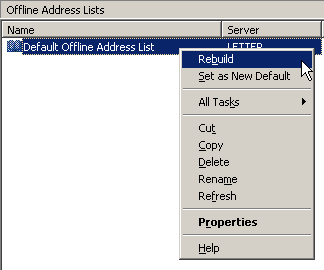
Figure 2: Rebuilding the OAB
Exchange Server 2007:
In Exchange Server 2007, the OAB can be updated using the following command from the shell:
Update-OfflineAddressBook “Name of Address Book”
To update all OABs:
Get-OfflineAddressBook | Update-OfflineAddressBook
Refresh the OAB in Outlook
On the client go to Outlook 2003/2007 | Tools | Send/Receive | Download Address Book….
– Uncheck Download changes since last Send/Receive
– Make sure Download Full Details is checked
– Click OK, wait for the download to complete (depending on your bandwidth and size of OAL, this may be close to instant, or it may take a few minutes)
– Check if the user appears in the GAL
Modify the OAB generation schedule
If you want to have new users show up in the GAL for Outlook Cached Mode users more quickly, you can update the OAB refresh interval to have Exchange update it more frequently.
Or wait…
Alternatively, you can wait till after Exchange has updated the OAB on its current schedule. When clients download the updated OAB, the new users will show up. Knowing why the delay occurs means you won’t spend time troubleshooting it.
Updates:
– 01/03/2008: Added screenshots and Exchange Server 2007-specific info
– 10/02/2008: Typo corrected in command
so when you have 1000+ users and this problem happens, you propose to do this on each workstation?
neg.
Not necessarily, depends on the urgency of having the new user(s) show up in the GAL and your Outlook deployment.
I created a new contact a week ago and my offline address book updates daily.
I still do not see this new contact, even after manually updating my offline addr book in Outlook.
What else could I try?
– Can you see the Contact if you turn off Outlook 2003’s Cached Mode?
– Does the Contact resolve in Outlook Web Access?
– Can others see the Contact?
Yes, I have the same problem. We have done every thing you have suggested but nothing works. We can not see only the new employees, we can view them when we turn off the cache mode. Do you have any other suggestions
Thanks
In cached mode, do you see the user in the All Users address book (not the default GAL)?
If yes, Offline Address Book: Mystery of The Missing Recipients
Ensure that the user’s default external e-mail address and the windows e-mail address (AD attribute) are exactly the same.
-H.
I have same problem. Nothing solved the problem. What I don’t understand is that the new user appear on every other computer and not on only one computer. We had this problem once, then we formatted, reinstalled Windows XP and the worked.
Yanick
Here is a little known fact….
There are 2 things that I have noticed that can affect Offline address books…
1. The [email protected] has strange characters in it. (I had a user with a hyphanated name and policy auto generated a hyphenated name).
2. The user Alias (found in the active directory tab exchange general) had a full stop or dash in it.
This particular client had people not showing up, removing the fullstops fixed all the problems. I am baffled as to why some users worked and others didnt, but after removing fullstops, updating the OAB and the clients had updated, they were all present.
This is fixed for me now. I have been trying everything on/off for 5 days. What seemed to do the trick:
1 “Ensure that the user’s default external e-mail address and the windows e-mail address (AD attribute) are exactly the same.” Thanks Heinrich!
2 Restart all M$Exch services. (I don’t know if this step was necessary. Maybe update OAB might have worked alone, but these were my exact steps.)
3 Update OAB.
Thanks to all ideas.
This is an awesome blog, so very clear and well formatted! Keep on posting, you rock!
An Outlook 2007 client picks up the GAL entries using web distribution from the web based oab virtual directory. The OAB data is delivered to the directory every 8 hours by default. To change this to 30 minutes, for example, use the following command:
Get-OABVirtualDirectory | Set-OabVirtualDirectory -PollInterval 30
If you’re impatient and want to manually update the OAB directory, use the following command:
Update-OfflineAddressBook -Identity [servername]
Now, go to Outlook 2007 and download the address book. The new entries should appear.
To force a complete OAB update, we’re in the habit of issuing the following commands:
get-offlineaddressbook | update-offlineaddressbook
update-filedistributionservice %CAS server name%
Run the update-filedistributionservice command for each CAS server. Of course Outlook 2007 cached-mode users still have to download the OAB again if they want the new information or simply wait 24 hours for it to happen automagically.
Your solution is not recommended in big organizations.
We released a policy that ney users will appear within 24 h, and that’s it.
Get-OfflineAddressBoook | Update-OfflineAddressBook has misspeling: “boook” (3 oo).
@Ziemek: Thanks for pointing out – the post has been corrected.
If you have a client in cached mode that is not updating the OAB, remove/rename *.oab files in their %userprofile%\Local Settings\Application Data\Microsoft\Outlook. Next time you start Outlook it will re-download the address book and create new OAB files. The problem was the oab files got corrupt and would not catch new updates. If it continues to happen, try excluding these oab files from your anti-virus scanner.
Can you help me on this error in my application log:
Type:Error
Source:MSExchangeAL
Category:Address List Synchronization
Event ID:8331
Description:
The service threw an unexpected exception which was caught at Drive:\Titanium\Dsa\Src\Lra\Abv_dg\Lservagent.cpp(4511)
I already rebuild my OAB but still the problem persists.I can’t connect my new users to their outlook.The errors says that “the name cannot resolve The name could not be matched to a name in the address list.”
I have the same problem. However, I also noticed that the Domain Users group type is unknown in the ADUC. Can any one help to resolve this issue?
how do you check the attributes on the accounts as suggested by Henrich?
@Anonymous from 2/3/2009: You can check the default email address in Email Addresses tab (if on Exchange 2003, this is in ADUC) and the Windows email address in the E-mail address field in the General tab.
On Exchange 2007, you can inspect the Windows email address in ADUC, and the primary SMTP address in ESM (Recipient properties -> Email Addresses tab) or by using the shell:
Get-Mailbox "My Mailbox" | Select WindowsEmailAddress,PrimarySmtpAddress
Hello, I had the same problem, I tried everything without success till I saw the tip of vkozlek.
I renamed all the oab files in the profile of the user and everything was ok.
Thank you
Thank you!
Hi!
The solution from Vkozlek really did the trick. Now the address shows up in the GLA again.
Oh, by the way. No, you don't need to do this on every client. Write a command file and send to those clients affected and let them run it (it's on their own account anyway).
No need to do it on a global scale if it is local.
Thanks again Vkozlek
Vkozlek's solution is the only one that worked for me, thanks.
Renaming / removing all *.oab type files works but the next time you create a new email address, it won’t show up in the Global Address List again.
The problem we have in out organization is that not every user is affected by this and its not viable to look for the affected user to perform the above mentioned action every time u create a new email address.
Update GAL in Exchnage and outlook 2007:
1- from MS Exchnage console, expand Organization Configuration, Mail Box, go to Offline Address Book tab, right click Default Offline Address Book, properties, click on Distribution tab, mark Enable public folder distribution, click Ok.
right click Default Offline Address Book, Update.
2- outlook:
from Send/Receive
Download Address Book
Uncheck Download changes since last send/receive.
Ok.
!!congratualtion!!
Mohamad
Thanks a million Vkozlek. Your solution worked !!!
SFZK
I had this same problem for the last couple months and had gone through all of the recommended fixes that I could find on the Internet for the server level and client level. None of them fixed it, not even blowing away the Default Offline Address Book on the server and recreating a new one. I read a post that said the local clients profile could contain a corrupt OAB so I ended up deleting all *.oab type files on the workstation within the user's profile. Restarted Outlook and voila all the new users/addresses are there. I am not sure how this could be fixed/deployed to a mass amount if cached Exchange users.
I just had the same problem and by recreating the users Outlook Profile and downloading all the content fresh fixed my problem.
This program looks promising, no use to me until the GAL and AL are identical. Waiting 24 hours for the Exchange Management Console to do it is just too long.
http://www.galupdate.co.uk
Ben
Hi Bharat, I came your blog frequently but this blog came twice while searching solution of my Outlook Address Book problem. Problem: Five users are facing problem in not listing the “All Rooms” and other address list in “Outlook Address Book”. The address book show only Globla Address List. My cases has some restriction to do troubleshooting like User can not use OWA 2. Outlook will be in online Mode. Configurations Status: 1. The organisation is very large will have more then 100 thousands users. 2. Offline Address Book is uptodate on the server. 3. Problemtic Users and other users are getting the updated OAB information in Outlook. Troublshooting Done: 1. Update the offline address book using outlook. 2. Delete the offline address book folder then then re-open the outlook. 3. Delete the profile but couldn’t help. 4. All settings seems fine at outlook. Questions: 1. Do we have some command to update the OAB for a user from cmdlets? 2. What will be the solution of this problem? Your quick reply will be appreciable. Thanks and Regards Shambhu Sharma
Had the same issues on exchange 2010 and found this on the net.
Don’t know if its going to work but going to try this weekend.
Since Exchange 2010 pretty much runs everything securely via OWA, local clients must resolve the internal email server to owa address. Our local DNS entries point clients to FQDN of actual email server. I had to put in another entry that resolved the IP of email server to address of OWA. Otherwise, clients could not resolve and update the address book
Is your internal DNS name the same as your external?
Sounds like you probably didn’t have the Autodiscover DNS entry set internally
you’d need 2 entries in DNS, both server and server.domain.local pointing at the CAS plus you’d need autodiscover pointing at the CAS and the correct entries in the OWA config.
Good luck to all.
Hey there are using WordPress for your blog platform?
I’m new to the blog world but I’m trying to get started and set up my
own. Do you need any coding knowledge to make your own blog?
Any help would be really appreciated!
[…] https://exchangepedia.com/2005/11/new-user-does-not-show-up-in-gal.html […]