
Here’s a script written in response to a newsgroup post today on microsoft.public.exchange.admin.
Exchange Server allows you to automatically forward inbound mail for one recipient to another recipient. You can forward messages to the alternate recipient, without delivering a copy to the original recipient (effectively redirecting inbound mail for the recipient), or deliver messages to both original and alternate recipients.
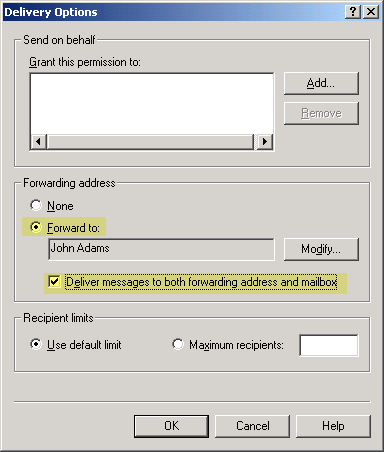
Figure 1: Exchange 2003 allows you to forward mail for one recipient to another recipient using Delivery Options
In Exchange 2013 and Exchange Online, you can find Delivery Options under Mailbox Features > Mail Flow. Users can also configure automatic email forwarding using OWA.
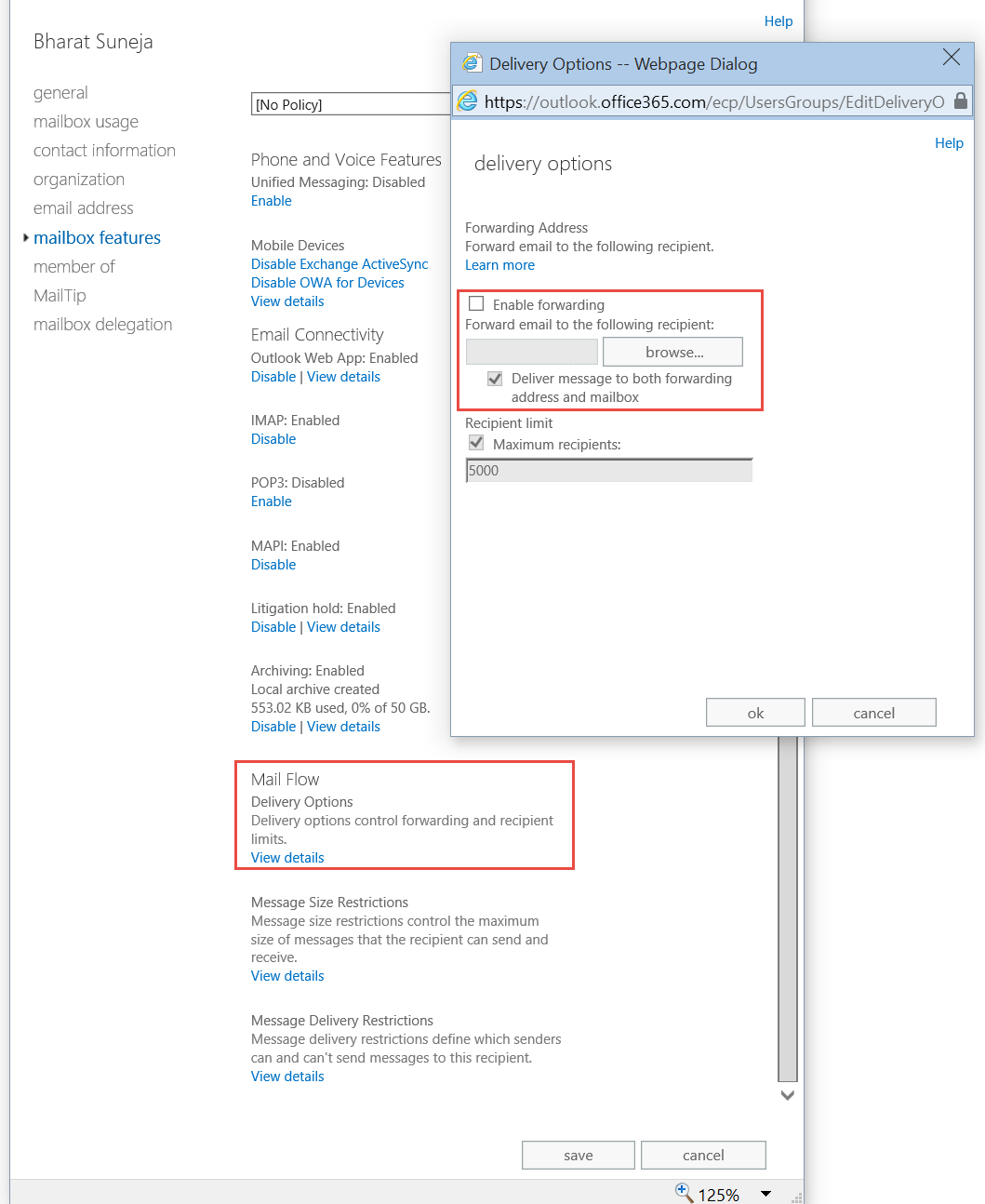
Figure 2: Configure automatic email forwarding using Delivery Options in the EAC in Exchange 2013 and Exchange Online
In Exchange 2010 and Exchange 2007, Delivery Options is found in the Mail Flow Settings tab in a recipient’s properties in EMC. In Exchange 2003, Delivery Options is on the Exchange General tab in ADUC. To forward to an external email address, create a (mail-enabled) Contact in AD, which is no longer required in Exchange 2013/Exchange Online – you can type an SMTP address in the field.
Listing Users With Forwarding Enabled
Requirement: List users with email forwarding enabled.
Using Saved Queries: On Windows Server 2003, this can be easily accomplished using Saved Queries. Create a new query. From the Find drop-down, select Custom Search. In the Advanced tab, type the following LDAP query:
(&(mailNickname=*)(altRecipient=*))
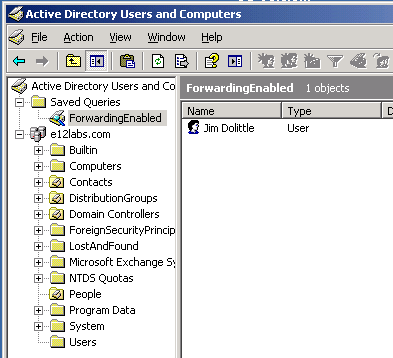
Figure 2:You can view recipients with forwarding enabled using ADUC’s Saved Queries feature
The other half of the requirement is to actually list the name of the user/mailbox being forwarded to. This is something ADUC can’t do – there’s no choice to add and display the altRecipient in a column next to each user.
The script will show all mailboxes setup to forward to an alternate recipient, the recipient being forwarded to (altRecipient), and also if messages are being delivered to both — the original recipient’s mailbox and the alternate recipient.
In Exchange 2010 and Exchange 2007, you can easily list this information using the shell:
Get-Mailbox -Filter {ForwardingAddress -ne $null} | ft Name,ForwardingAddress,DeliverToMailboxAndForward -Autosize
As reader Charles Howard points out in the comment (dt. Jan 29, 2009), the ForwardingAddress is output as the Active Directory object (john smith domain.net\contacts\someguy) instead of the SMTP address. The following command can output the PrimarySMTPAddress of the recipient:
Get-Mailbox -Filter {ForwardingAddress -ne
$null} | foreach {$recipient = $_; $forwardingsmtp = (Get-Recipient $_.ForwardingAddress).PrimarySmtpAddress; Write-Host $recipient.Name, $forwardingsmtp, $recipient.DeliverToMailboxAndForward }
Updates:
– 3/3/2015: Added Exchange 2013 and Exchange Online/Office 365 screenshot and info.
– 11/25/2008: Added Exchange 2007 info and command
– 2/1/2009: Added command to output primary SMTP address of recipient being forwarded to.
– 9/21/2011: Fixed script download link
Bharat, any chance you could help me out and mod this script a little. I ran it as is and there were over 200 users listed. This of course ran off the screen, and this is a report that I need to get across several of my email environments. We are in the process of collapsing email environments, to go form 12 to 1. Having the output sent to file would be brilliant.
Your help is greatly appreciated.
Kind regards,
David Buckley:)
David,
Output to a text file from any script is quite easily accomplished from the command line.
scriptname.vbs >filename.txt
OR
scriptname.vbs >filename.csv
creates a new file.
scriptname.vbs >>filename.txt
appends to an existing file.
I normally include a /f: switch with scripts to output to a file, but forgot to do that in this script. Will add this soon!
Bharat
I used this code to add to my “Saved Queries” and it worked perfectly. Thanks. I’m also looking for a reporting method to show mailbox usage for my Exchange 2000 server. Do you have any suggestions on reporting on this info?
I used this code in my “Saved Queries” and it worked perfectly. I am looking for a way to report on my Exchange 2000 users mailboxes to report on mailbox usage. (Whether or not they are actually being used by the Owner) Do you have any suggestions?
email me rod at rodharrison dot com
I used your code in my “saved queries” and it worked perfectly. I am looking for a method to report on my Exchange 2000 mailboxes to see if they are actually being used by the mailbox owner. Do you have any suggestions on how to do this?
On my 2007 Exchange box, the powershell cmd is (notice DeliverToMailboxAndForward):
Get-Mailbox -Filter {ForwardingAddress -ne $null} | ft Name,ForwardingAddress,DeliverToMailboxAndForward -Autosize
@dafa: Thanks for pointing out – corrected.
i know.. very old post. hopefully the author takes a peek.
This command works great but is it possible to get the actual email address that it forwards to instead of just the contact object?
for example:
john smith domain.net\contacts\someguy [email protected]
@Charles: Post updated with additional command to spit out SMTP address of the ForwardingAddress recipient.
I’m wanting to find the post that has the actual script in it. I’ve found loads of posts that reveal the contact the mailbox is forwarded to, but I really need the actual email address. Can you send me the script or point me in the right direction? Cheers
Hi Keith,
Please see the last code snipped in this post – it lists the mailbox and the SMTP address to which messages are forwarded.
Bharat,
I’m getting a null error (line 48, character 13) when running the script – am new to vbs scripts so can you help me troubleshoot please?
Matt
Hi Bharat, how can I redirect the output to a txt file?
thank you very much for you help.
Melissa Monroy.
Bharat already answered this Q, scroll up and see ;)
Any idea why I can't get the altrecipient attribute to take a wildcard string? For instance, to look for any user whose alternate recipient's name starts with an S, the following does not work: (altrecipient=CN=S*)
Typing the whole canonical name out works fine (altrecipient=CN=Smith\, John,OU=Users,DC=acme,DC=com), and so does replacing the search with a plain * it's just using a partial string wildcard that refuses to work.
Link to the Zip file seems to be broken….
Link to the Zip file seems to be broken….
Hi,
How to take Out Put ib text or csv format
Hello,
Is there a way you can output the result of this scrip to a csv or txt file:
Get-Mailbox -Filter {ForwardingAddress -ne
$null} | foreach {$recipient = $_; $forwardingsmtp = (Get-Recipient $_.ForwardingAddress).PrimarySmtpAddress; Write-Host $recipient.Name, $forwardingsmtp, $recipient.DeliverToMailboxAndForward }
Thanks
Can you please provide an update for this that will work with Exchange 2010? When I try to run the 2nd command (which shows the actual email address that the messages are being forwarded to), I get the following error for each user:
Pipeline not executed because a pipeline is already executing. Pipelines cannot be executed concurrently.
+ CategoryInfo : OperationStopped: (Microsoft.Power…tHelperRunspace:ExecutionCmdletHelperRunspace) [],
PSInvalidOperationException
+ FullyQualifiedErrorId : RemotePipelineExecutionFailed
Pipeline not executed because a pipeline is already executing. Pipelines cannot be executed concurrently.
+ CategoryInfo : OperationStopped: (Microsoft.Power…tHelperRunspace:ExecutionCmdletHelperRunspace) [],
PSInvalidOperationException
+ FullyQualifiedErrorId : RemotePipelineExecutionFailed
Hi,
Hope this thread still alive.
Great script, helped me a lot.
Only thing thou, when I try to output it to a txt file (script.vbs>file.txt), I get an empty file, 0KB.
Any idea why?
[…] List users with email forwarding enabled […]
Jonathan use this:
cmd
cscript myscript.vbs > c:\scripts\log.txt
Exchange Server allows you to forward inbound mail for one recipient to another recipient. The script seems really effective. This command works correctly and with great convenience.
Any chance that this can output into a CSV file? Please and thank you.
Get-Mailbox -Filter {ForwardingAddress -ne
$null} | foreach {$recipient = $_; $forwardingsmtp = (Get-Recipient $_.ForwardingAddress).PrimarySmtpAddress; Write-Host $recipient.Name, $forwardingsmtp, $recipient.DeliverToMailboxAndForward }
anyone can help me for pipeline error ?
“Pipeline not executed because a pipeline is already executing. Pipelines cannot be executed concurrently.”
i tried this command at my EX2k10
Get-Mailbox -Filter {ForwardingAddress -ne
$null} | foreach {$recipient = $_; $forwardingsmtp = (Get-Recipient $_.ForwardingAddress).PrimarySmtpAddress; Write-Host $recipient.Name, $forwardingsmtp, $recipient.DeliverToMailboxAndForward }
[…] Exchange Server and Exchange Online allow your users to automatically forward email to an external email address. I’ve written about forwarding email to an external email address in Exchange, the risks of forwarding work email to personal email accounts and listing users with email forwarding enabled. […]
Can anyone help me out to create a powershell script as per below requirements.
1. We are planning to add new SMTP address to our existing users and so we want to set auto reply message as per below to all user mailbox.
2. Script should take user display name with old email id and new email id and set below customize message on each of individual mailboxes
3. Reply message should be as per below
4. Script should take all BOLD content from excel sheet and set customize auto reply message to each individual mailboxes
Dear Sender,
Please note that my email id has been changed from [email protected] to [email protected] , hence for the please send mail on new email id only…
Regards,
‘User name’
Note: We are having Exchange 2010 environment
I also got the error: “Pipeline not executed because a pipeline is already executing. Pipelines cannot be executed concurrently.”
I made the following command:
Get-Mailbox -Filter {ForwardingAddress -ne $null} -Resultsize Unlimited | select UserPrincipalName, PrimarySmtpAddress, SamAccountName, @{N=”ForwardingTo”; E={(Get-Recipient $_.ForwardingAddress).PrimarySmtpAddress}} | ft -AutoSize
If you want to export it to a CSV-File:
Get-Mailbox -Filter {ForwardingAddress -ne $null} -Resultsize Unlimited | select UserPrincipalName, PrimarySmtpAddress, SamAccountName, @{N=”ForwardingTo”; E={(Get-Recipient $_.ForwardingAddress).PrimarySmtpAddress}} | Export-CSV “C:\temp\ForwardingTo.csv” -Encoding UTF8 -NoTypeInformation
Change name or location by updating the path “C:\temp\ForwardingTo.csv”.
I have tested this command on 2010, 2013 & 2016 and besides the information for the SamAccountName also for Exchange Online. (10/11/2023)